
To send newsletters and automations through your own Postmark account, connect a Postmark server token and account token to your Mimeo, keep marketing email on a Broadcasts stream, and add one webhook so bounces, complaints and unsubscribes come back. Your whole email operation stays on your own server: flows that start on any event, sequences and broadcasts, run from the web UI or by your agent, at a flat software price. Your Postmark account delivers each email. Mimeo decides who gets what and when, and checks each person against your suppression list before it hands an email over.
What Postmark does, and what your Mimeo does
Your Mimeo runs the email operation; Postmark delivers it.
Your people, flows, sequences, broadcasts and suppression list live in your Mimeo, on your server. A signup, a purchase or something in your app arrives as an event and can start a flow. You run it all from the dashboard, or let your agent do it on the same flows.
When an email is due, your Mimeo hands it to your Postmark account, which delivers it and reports back by webhook. Mimeo is never the sender and never promises the inbox: delivery runs on your Postmark account and your domain's reputation. Open and click tracking and the unsubscribe link stay in your Mimeo, which is why Mimeo turns Postmark's own tracking off on every email.
Your Mimeo price stays flat as your list grows. Postmark bills for sending on its own pricing.
Postmark also offers a Bulk API for newsletters, enabled on request through its support. Mimeo doesn't use it. It hands Postmark one email per person, so the suppression check, guards and tracking apply to every person, and there is no Bulk API approval to wait for.
Before you start
You need a running Mimeo and a Postmark account that is ready to send.
- Your Mimeo, running at your own address. Run Mimeo on your own server covers it.
- A Postmark account with a server. Postmark organizes tokens, streams and webhooks under a server.
- Your sending domain verified in Postmark (its DKIM record), or a confirmed sender signature for each from address.
- Account approval requested. Until Postmark approves your account, it only sends to addresses on your own verified domains.
- Access to your domain's DNS, for the one record Mimeo needs for its links (Domains & senders).
- For the agent tab: Claude Code or Codex, working in your manager repo (Getting yours).
At the end, your broadcasts, sequences and flows go out through your Postmark account, and bounces, complaints and unsubscribes come back and stop further email to those people.
Steps
You connect Postmark once; after that, every flow, sequence and broadcast sends through it. Both tabs reach the same setup. The keys are pasted into your Mimeo's own screens in both, because they never go through the API or the manager repo.
Build it in Mimeo
1 Choose Postmark
Sending setup is one short wizard, done once.
Open Settings. Until sending is set up, it opens Set up sending, four steps: Pick your provider, Connect it, Your senders, Your domains. Pick Postmark. The wizard lists what to finish in Postmark first, the same list as Before you start; partway through is fine.
2 Paste your two Postmark tokens
The server token sends your email; the account token lets Mimeo read which domains and senders Postmark has verified.
In Connect it, paste the Server token (Postmark → your server → API Tokens) and the Account token (Postmark → Account, top-right menu → API Tokens). Without the account token, nothing sends.
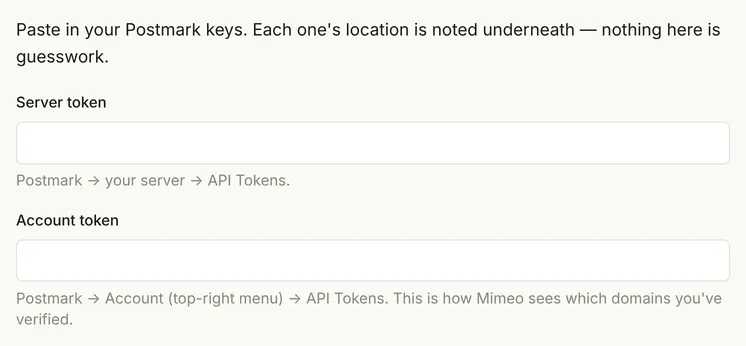
The Broadcast stream field comes filled in with broadcast. Postmark shows each stream's ID at the top right of the stream's page; if your Broadcasts stream has a different ID, paste that. Marketing email belongs on a Broadcasts stream, not the default Transactional one.
3 Add the webhook in Postmark
The webhook is how bounces, complaints and unsubscribes reach your Mimeo.
Mimeo fills in a Webhook secret and shows the complete Webhook URL. Copy it now: saved secrets are never shown again. In Postmark, go to your server → your Broadcasts stream → Settings → Webhooks → Add webhook, paste the URL and tick Delivery, Bounce, Spam Complaint and Subscription Change. Leave Open and Link Click off; Mimeo tracks those itself.
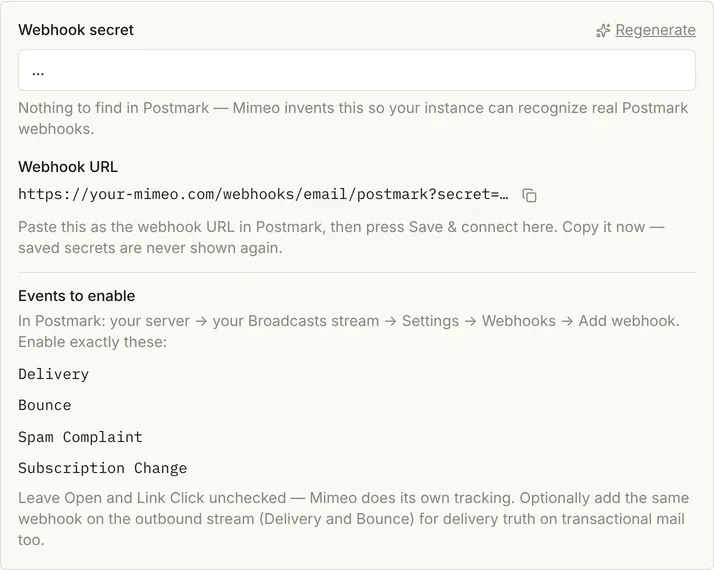
Then click Save & verify. Mimeo checks the tokens and the stream, and reads Postmark's verified domains and senders. If Postmark refuses, the wizard says so in Postmark's words, starting "Postmark says:". The tokens are stored encrypted in your Mimeo, never in a file.
4 Confirm your senders and domain
Nothing sends from an address Postmark hasn't verified, even after your Mimeo has.
In Your senders, add the name and address your email comes from, and your mailing address for the footer. In Your domains, add the one link record each domain shows and click Check now. A domain needs both Mimeo's DNS check and Postmark's verification to show Connected, and Finish setup unlocks when every domain does.
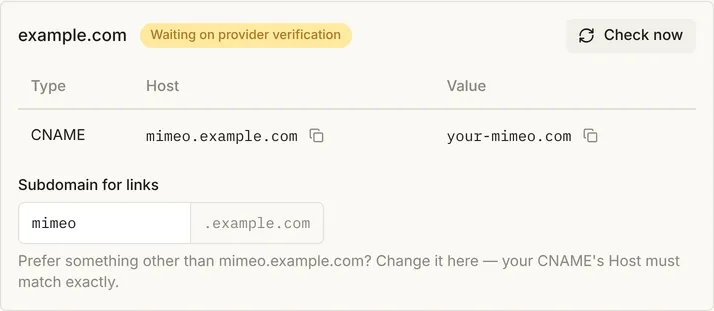
A send from an address Postmark hasn't verified is refused with the fix: "Postmark hasn't verified jordan@example.com for sending — verify example.com in the Postmark dashboard, then press Check under Settings → Domains & senders."
5 Send yourself a test
A test send proves Postmark accepts email from your Mimeo.
Open any email and send a test to yourself. It goes to Postmark on your Broadcasts stream and is marked as a test, so nobody's history changes. In the test, Postmark accepted it and returned its message ID. Accepted is not yet delivered; the Delivery webhook confirms that.
6 Send a broadcast
Broadcasts, sequences and flows all go out on your Broadcasts stream, and Postmark gets each email for one person at a time.
Send the broadcast. Mimeo hands Postmark one email per person on the Broadcasts stream, with Postmark's tracking off and Mimeo's own unsubscribe link and one-click unsubscribe headers, at your account's pace. In the test, a broadcast to 4 people made 4 separate requests, and Postmark accepted each. People already unsubscribed are never handed to Postmark.
7 Check what came back
Each webhook updates the person it is about.
A delivery marks the email delivered. A temporary (soft) bounce leaves the person subscribed. A hard bounce, a spam complaint or an unsubscribe through Postmark's own link unsubscribes them, with the reason on their page, and the next send to them is refused.
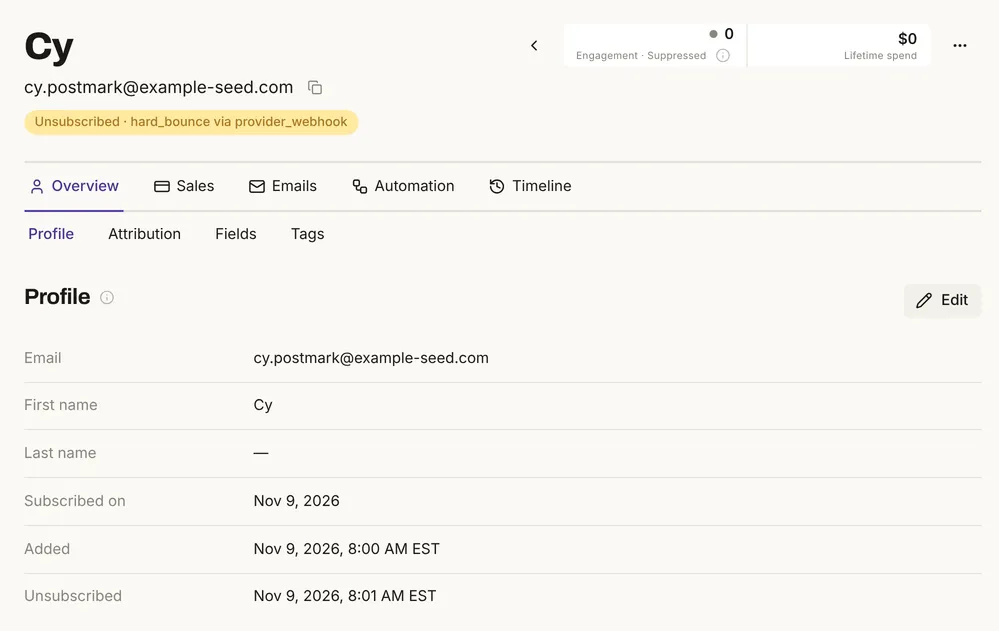
The test send to that person afterwards was refused: "cy.postmark@example-seed.com is unsubscribed — send blocked by the standing suppression guard." Unsubscribes made in your Mimeo are added to Postmark's suppression list for the stream. Removing a suppression in Postmark does not resubscribe anyone in your Mimeo; your Mimeo's list decides.
Two unsubscribe links. By default, Postmark adds its own unsubscribe link to broadcast email, so readers see two. Both work and stay in step. For one link, ask Postmark support for custom unsubscribe handling and set the stream to manage unsubscribes on your own; Mimeo reminds you when you verify until then.
Build it with your agent
1 Ask what Postmark needs
What do I need from Postmark before I connect it to my Mimeo?
What to look for: a server, a verified domain or sender signature, account approval, the server and account tokens, and the Broadcasts stream ID. Your agent can't paste the tokens for you: you enter them in Settings → Set up sending, as in the other tab.
2 Send a test through Postmark
Send a test of the welcome email to me@mydomain.com and tell me whether Postmark accepted it.
What to look for: accepted by the provider, which is not yet delivered.
3 Find out why a send was refused
If that test was refused, tell me why and what to fix.
What to look for: the refusal in Mimeo's words. In the test, a sender Postmark hadn't verified got "Postmark hasn't verified jordan@example.com for sending — verify example.com in the Postmark dashboard, then press Check under Settings → Domains & senders."
4 Check who bounced or complained
After the newsletter goes out, show me who bounced or complained and whether they were unsubscribed.
What to look for: each person with their email's status and, for hard bounces and complaints, unsubscribed with the reason.
5 Unsubscribe someone
Unsubscribe pat@example.com and confirm they won't get the next broadcast.
What to look for: the person unsubscribed in your Mimeo, which also adds them to Postmark's suppression list for the stream. The Postmark API page and the MCP server cover what your agent can reach.
Limits
The Mimeo side was tested on a local install with Postmark's test token, which accepts email and delivers nothing.
- No Postmark account was used. A passing Save & verify, Postmark's list of verified domains, real delivery and a successful suppression push to Postmark were not run.
- The webhooks were Postmark-shaped requests sent to the local install, not sent by Postmark.
- Postmark's own settings were not seen: the Bulk API, stream settings and the two unsubscribe links are as Postmark and the docs describe them.
- Postmark's prices and limits are Postmark's. See Postmark's pricing.
- A safeguard is a check, not a lock. The suppression list and guards don't stop someone with an operator token from sending.
When not to use this
Three cases have a better choice than running your email in Mimeo and sending through Postmark.
Facts, checked
Every changeable fact on this page, with its source and the date it was last checked.
| Fact | Value | Source | Checked |
|---|---|---|---|
| Release tested | Mimeo 0.3.4 | Changelog | |
| Sending providers | Postmark, Resend; a test provider that delivers nothing | Set up sending | |
| What Mimeo needs from Postmark | Server token, account token, Broadcasts stream ID, and the webhook; keys entered only in your Mimeo's screens, stored encrypted (tested and documented) | Postmark setup | |
| Verified senders only | Tested: a send from an address Postmark hadn't verified was refused with the fix | Domains & senders | |
| What Mimeo hands Postmark | Tested: one request per person on the Broadcasts stream, Postmark tracking off, Mimeo's unsubscribe headers; application email on outbound. No Bulk API or Postmark templates |
Postmark setup | |
| Pace | Documented: a broadcast spreads at 5,000 an hour unless you set another pace | Broadcasts | |
| Webhooks | Tested with Postmark-shaped requests: delivery, soft bounce (stays subscribed), hard bounce, complaint and Postmark-link unsubscribe (unsubscribed), wrong secret refused, repeats change nothing | Postmark setup | |
| Suppression sync | Unsubscribes in Mimeo are pushed to Postmark (documented; tried, refused by the test token). Lifting a suppression in Postmark resubscribes nobody (tested) | Postmark setup | |
| Unsubscribe links | Documented: Postmark adds its own link by default; custom unsubscribe handling through Postmark support removes it | Postmark setup | |
| Postmark's Bulk API | Postmark's own: for newsletters, enabled on approval through Postmark support | Postmark Bulk API | |
| Streams and Stream ID | Postmark's own: Broadcast streams for one-to-many email; the ID is at the top right of the stream's page | Postmark message streams | |
| Account approval | Postmark's own: until approved, only your own verified domains; review in less than 24 hours on weekdays | Postmark account approval |
How this was tested
Runs on one local install on November 9, 2026, with no real email delivered.
- Mimeo 0.3.4 in development, with the app's demo data: 200 people on example-seed.com, plus five test people. No customer data.
- Postmark's public test token as the server token, and no account token. Postmark accepted 1 test send, a 4-person broadcast and 1 application email.
- 8 webhooks written in Postmark's documented shape and posted to the install: one with a wrong secret, then delivery, soft bounce, hard bounce, complaint, an unsubscribe, a lifted suppression and a repeat.
- The screens were captured the same day in the setup wizard. Postmark's verification was written in by hand for the domain screen and the sends, since the test token can't read it. The agent prompts were not run with a coding agent.
Next
With Postmark connected, every flow, sequence and broadcast in your Mimeo sends through it. Build the flows next.
- Flows and Activity & events: start a flow on a signup, a purchase or anything your app sends.
- Postmark setup: every field, stream and webhook detail.
- Set up sending: the setup wizard for Postmark or Resend.
- Domains & senders and Broadcasts.
- Move from Mailchimp or Kit: bring your opt-outs over before the first send.
- Pricing: the flat software price, the license and requirements.