
To send newsletters and automations through your own Resend account, connect it to your Mimeo with a Full access API key and one webhook. Your whole email operation then runs on your own server: flows that start on any event, welcome sequences and broadcasts, run from the web UI or by your agent, at a flat software price. Every email goes out through Resend's Emails API, one person at a time through Mimeo's paced queue. Resend delivers it and reports bounces and complaints back.
What Resend does and what your Mimeo does
Your Mimeo runs the email operation and keeps the list; Resend delivers each email.
Your people, unsubscribes, flows, sequences, broadcasts and open and click tracking all live in your Mimeo, on your server. A signup, a purchase or something in your app arrives as an event and can start a flow. You run it all from the dashboard, or let your agent do it on the same flows.
Mimeo doesn't use Resend's contacts, Broadcasts or Automations. When an email is due, the queue checks the person and your guards, then hands Resend one email for one person, with Mimeo's own unsubscribe headers. Mimeo is never the sender and never promises the inbox: delivery runs on your Resend account and your domain's reputation.
Resend sends back what happened through a signed webhook: delivered, bounced, complained, or skipped because the address is on Resend's suppression list. Every email Mimeo sends counts against your Resend plan's email quota, so a newsletter to 2,000 people is 2,000 emails. Your Mimeo price stays flat as the list grows.
Before you start
You need a Resend account, your Mimeo running, and an address on your own domain.
- A Resend account with access to your domain's DNS.
- Your Mimeo, running on your server (run it on your own server).
- An address to send from on your own domain, such as
hello@updates.yourdomain.com. - For the agent tab: Claude Code or Codex, working in your manager repo (Getting yours sets it up).
At the end, your Mimeo is verified against Resend, bounces and complaints flow back into it, and a test send has been accepted.
Steps
You connect Resend once; after that, every flow, sequence and broadcast sends through it. Both tabs reach the same result. The API key and the webhook secret are pasted by you in Settings in either case: they never go through the API, the MCP server or the manager repo.
Build it in Mimeo
1 Verify your sending domain in Resend
Your Mimeo won't send from an address Resend hasn't verified, so start here.
In Resend, open Domains, add your domain and put the DNS records it shows at your DNS host. Resend recommends a subdomain such as updates.yourdomain.com, which keeps this mail's reputation apart from your other mail. DNS can take a while, so carry on while it settles.
2 Create a Full access API key
Mimeo reads your verified domains with the key, so a send-only key isn't enough.
In Resend, open API Keys, create a key and give it Full access. A key with Sending access only is refused with Mimeo's message: "This API key only has Sending access, but Mimeo also needs to read your verified domains. Create a new API key in Resend with Full access permission and save it here."
3 Connect Resend in your Mimeo
The key goes into your Mimeo's Settings, where it is stored encrypted.
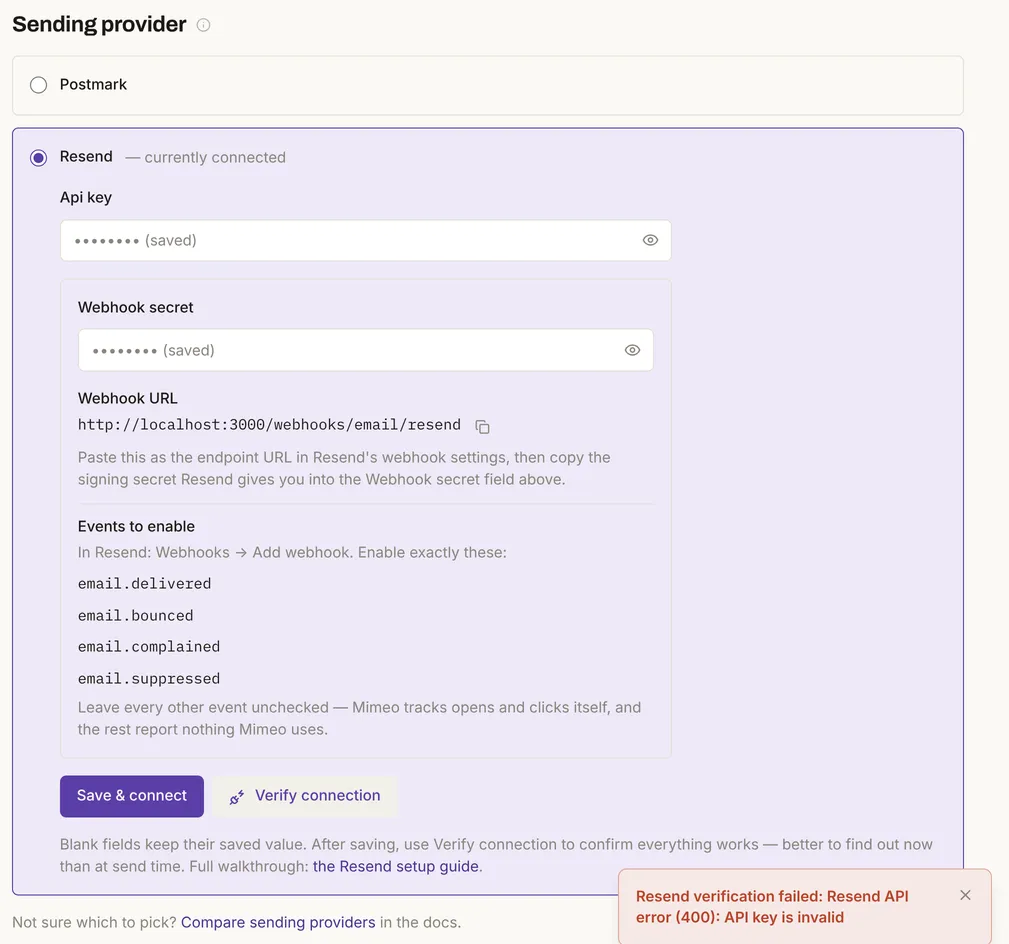
On a fresh Mimeo, Get set up to send on the dashboard walks through this. Later, it's Settings → Provider: choose Resend, paste the key into Api key, click Save & connect, then Verify connection. Verify connection asks Resend for your domains. With a good key it passes once a domain is verified; it fails while every domain is still pending, and names them. In the test, a wrong key got Resend's own answer back.
4 Add the webhook
The webhook is how Resend tells your Mimeo about bounces, complaints and addresses it skipped.
Under the key, Settings → Provider shows the Webhook URL, ending in /webhooks/email/resend, with a copy button. In Resend, open Webhooks → Add webhook, paste the URL and enable exactly email.delivered, email.bounced, email.complained and email.suppressed. Copy the signing secret Resend gives you (it starts whsec_) into Webhook secret and click Save & connect.
Your Mimeo only accepts webhooks signed with that secret in the last 5 minutes. In the test, an unsigned request, one signed with another secret and one signed 10 minutes earlier were each refused and changed nothing. Leave Resend's open and click tracking off, because your Mimeo tracks opens and clicks itself.
5 Add your sender and send a test
A sender is the from address your emails use, and a test send is the first email that goes through Resend.
Open Settings → Domains & senders. Under Sending domains, add your domain, add the one CNAME it shows for your links, and click Check now until it reads Connected and Verified at Resend. Under Senders, add the name and address you send from. Then open an email and click Send test.
If the sender's domain isn't verified at Resend, the send is refused before anything leaves: "Resend hasn't verified … for sending — verify … in the Resend dashboard, then press Check under Settings → Domains & senders." From a verified sender, your Mimeo sends Resend one email with the from address, one recipient, the subject, the HTML and its own one-click unsubscribe headers. Resend's delivered@resend.dev and bounced@resend.dev are safe addresses to test with.
6 Check what came back
A bounce or complaint unsubscribes the person, and your Mimeo stops sending to them.
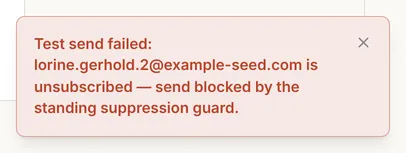
In the test, a permanent bounce marked the send bounced and unsubscribed the person. Their page reads "Unsubscribed · hard_bounce via provider_webhook". A complaint did the same with "complaint", and an address Resend had suppressed with "provider_suppression". A temporary bounce, such as a full mailbox, marked the send bounced and left the person subscribed.

From then on, even a test send to that person is refused.
Build it with your agent
1 Connect Resend yourself
The key and the webhook secret are yours to paste, so this step happens in Resend and in Settings → Provider, not through your agent.
Verify your domain in Resend, create a Full access API key, paste it into Settings → Provider → Resend, add the webhook with the four events, and paste its signing secret into Webhook secret. Your agent can give you the order without seeing either value.
I'm connecting my Mimeo to Resend. Read mimeohq.com/docs/providers/resend and give me a checklist of what to do in Resend and in my Mimeo's Settings, in order. Don't ask me for the API key or the webhook secret.
What to look for: a checklist that ends with Verify connection passing, and no request for either secret.
2 Send a test
A test send is the first email that goes through Resend.
Send a test of the Welcome email to my own address and tell me exactly what Mimeo said.
What to look for: "accepted", which means Resend took the email, not that it arrived. A refusal names the reason, such as a sender whose domain Resend hasn't verified.
3 Check a bounced address
Your agent can read whether someone was unsubscribed, why and how.
Look up the address that bounced on the last newsletter and tell me whether they're unsubscribed, why, and how it happened.
What to look for: unsubscribed, with the reason (hard_bounce, complaint or provider_suppression) and the source provider_webhook. The MCP server and the Resend API notes cover what your agent can see.
Why not Resend's own Broadcasts and Automations?
Because Mimeo runs your whole email operation on your own server, and Resend only has to deliver it. Mimeo publishes this guide; Resend's features below are from its own docs, checked .
Resend's Broadcasts send to contacts stored in Resend, and its Automations run steps on events your app sends to Resend. Mimeo keeps your list, flows and sequences on your own server. Its flows start on any event it receives, such as a signup, a purchase or something in your app, and branch on what people do. They work alongside sequences, broadcasts, segments and guards, so a promotion doesn't land in the middle of a welcome sequence. Your team runs them from the dashboard while your agent works on the same flows. If you leave Resend for Postmark, it's a Settings change: your people, flows and history stay where they are.
Resend prices Broadcasts by the contacts you keep in Resend. Sending through the Emails API, as Mimeo does, counts every recipient as one email against your plan's email quota instead. Resend's own pricing FAQ allows newsletters through the Emails API when people opted in and can unsubscribe, with a visible unsubscribe link and the one-click unsubscribe headers. Mimeo adds the headers to every marketing email; keep the unsubscribe link in your template's footer.
Limits
The test proved the Mimeo side of the connection; Resend's side is documented, not tested.
- No email reached Resend. Verify connection ran against Resend with a wrong key; the webhooks were Resend-format requests signed locally; the send was built with the connection to Resend stubbed out.
- Mimeo doesn't know your Resend plan. It paces sends by the minute (see Sending pace below), not by your plan's quota, and Resend's Free plan stops at 100 a day. What your Mimeo shows when Resend refuses a send for quota wasn't tested.
- Mimeo doesn't read Resend's suppression list. An address already on it reaches your Mimeo only when a send to it is skipped.
- Accepted isn't delivered. A send Resend accepts can still bounce later; the webhook is what tells you.
- "Currently connected" isn't verified. Settings shows Resend as currently connected once a key is saved, even a wrong one; Verify connection is the check.
When not to use this
Three cases have a better fit than running your email in Mimeo and sending through Resend.
Facts, checked
Every changeable fact on this page, with its source and the date it was last checked.
| Fact | Value | Source | Checked |
|---|---|---|---|
| Release tested | Mimeo 0.3.4 | Changelog | |
| Sending providers | Postmark, Resend; a test provider that delivers nothing | Set up sending | |
| API key | Full access. Tested: a wrong key gets Resend's "API key is invalid". A Sending access key is refused (from the code) | Resend in Mimeo | |
| Webhook | URL ending /webhooks/email/resend; events email.delivered, email.bounced, email.complained, email.suppressed. Tested: unsigned, wrongly signed and stale (over 5 minutes) requests refused |
Resend in Mimeo | |
| What each event does | Tested: delivered marks the send; a permanent bounce, a complaint or a Resend suppression unsubscribes the person; a temporary bounce doesn't | Resend API notes | |
| What Mimeo sends | Tested with the connection stubbed: Resend's Emails API, one email per person, with Mimeo's one-click unsubscribe headers; refused before sending from an unverified domain | Resend API notes | |
| Sending pace | Tested values: the lower of 600 a minute (Resend's 10 requests a second) and your Mimeo's maximum, 300 a minute by default | Queue | |
| Unsubscribed people | Never emailed, test sends included (tested) | People | |
| Resend plan quotas | Documented: Free, 3,000 emails a month and 100 a day; Pro, 50,000 a month and no daily cap; every Emails API recipient counts as one email | Resend pricing | |
| Resend rate limit | Documented: 10 requests a second per team, on every plan | Resend rate limit | |
| Resend Broadcasts | Documented: sent to a segment of contacts stored in Resend | Resend broadcasts | |
| Resend Automations | Documented: steps such as delays, conditions and sending an email, triggered by events your app sends to Resend | Resend Automations | |
| Resend suppression list | Documented: team-wide; sends to listed addresses are skipped and reported as email.suppressed. Mimeo doesn't read or write it |
Resend suppressions | |
| Resend test addresses | Documented: delivered@resend.dev, bounced@resend.dev, complained@resend.dev, suppressed@resend.dev; they count against your quota |
Resend test emails | |
| Verifying a domain in Resend | Documented: Domains, DNS records; a subdomain recommended | Resend domains |
How this was tested
One local install on November 9, 2026, without a Resend account, so no email reached Resend.
- Mimeo 0.3.4 in development, with the app's demo data: 200 people on example-seed.com. No customer data.
- Verify connection ran against Resend with a deliberately wrong API key and got Resend's own error back.
- Resend-format webhooks, signed with a locally made secret, were posted to the Mimeo's own webhook address: unsigned, wrongly signed, stale, delivered, temporary and permanent bounces, a complaint and a suppression.
- The test send was built with the connection to Resend stubbed out, so the request was recorded, not sent. The screens were captured the same day. The agent prompts were not run with a coding agent.
Next
With Resend connected, every flow, sequence and broadcast in your Mimeo sends through it. Build the flows next.
- Flows and Activity & events: start a flow on a signup, a purchase or anything your app sends.
- Resend in Mimeo: every setting, and where to look later.
- Set up sending: the setup wizard, step by step.
- Domains & senders and Broadcasts.
- Migrate from Mailchimp or Kit: bring your list over first.
- Pricing: the flat software price, the license and requirements.