Let an AI agent run your email without accidental sends
Updated · Tested on Mimeo 0.3.1
Check every change before it reaches anyone, and keep each send a step you approve. Mimeo lets you do both in its own screens or through your coding agent in the Mimeo Manager repo: rehearse a flow against a real person, let guards check every email as it sends, and keep new flows drafts until you make them live.
What counts as an accidental send
An accidental send is an email someone gets because a change did something you didn't expect; each kind has its own check in Mimeo.
| Mistake | What catches it | Evidence |
|---|---|---|
| A change you didn't mean to make | The step's own checks in the app, or the diff your agent shows first | Tested |
| A flow points at an email that doesn't exist | Validation refuses the change | Tested |
| A flow starts on the wrong event or condition | A rehearsal shows what would happen to a real person, and writes nothing | Tested |
| A promotion lands on people who should not get it | A guard drops the email at send time | Tested |
| A test email goes to someone who unsubscribed | Suppression blocks test sends too | Tested |
| A new flow starts mailing before you're ready | It stays a draft until you make it live | Tested |
Before you start
You need two things, and two more for the agent tab.
- Your Mimeo, on your server or a local install.
- A sending provider: Postmark or Resend (Amazon SES is coming soon), or the built-in test provider, which records sends and delivers nothing.
- For the agent tab: a coding agent such as Claude Code or Codex, working in your manager repo (Getting yours sets it up).
At the end, every change is checked before it applies and again when it sends, and each real send waits for your yes.
Steps
Both tabs make the same change to a lead magnet flow, a new tag for its downloaders, and end with a send you approve.
Build it in Mimeo
1 Save a checkpoint before you edit a live flow
A change to a live flow applies as soon as you save it, so keep a version to return to.
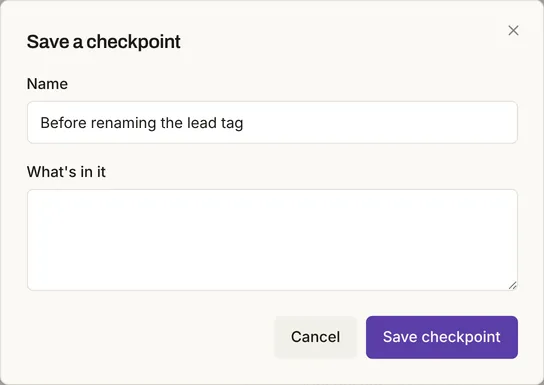
On the flow's page, open Flow actions (the ⋯ button), choose Save a checkpoint…, give it a name and click Save checkpoint.
The checkpoint appears under the flow's Versions tab.
2 Change the step and read its checks
Mimeo checks a flow every time it changes and says what looks wrong on the flow's page.
Click the step's edit icon, change the field (here Tag, from lead-magnet to lead-magnet-guide) and click Save step.
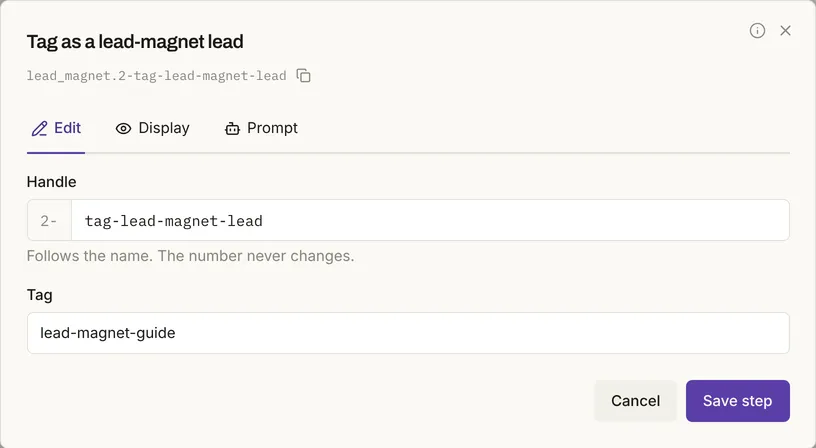
After saving, the flow page flagged the step: the tag "doesn't exist yet. It will be created the first time this step runs — check the spelling." A typo would look exactly like this.
3 Rehearse the flow
A rehearsal shows what would happen to one real person if the flow's event arrived now.
Click Rehearse it (the play icon above the canvas). In the Rehearsal panel, pick a Person, check the Event, and click Run it.
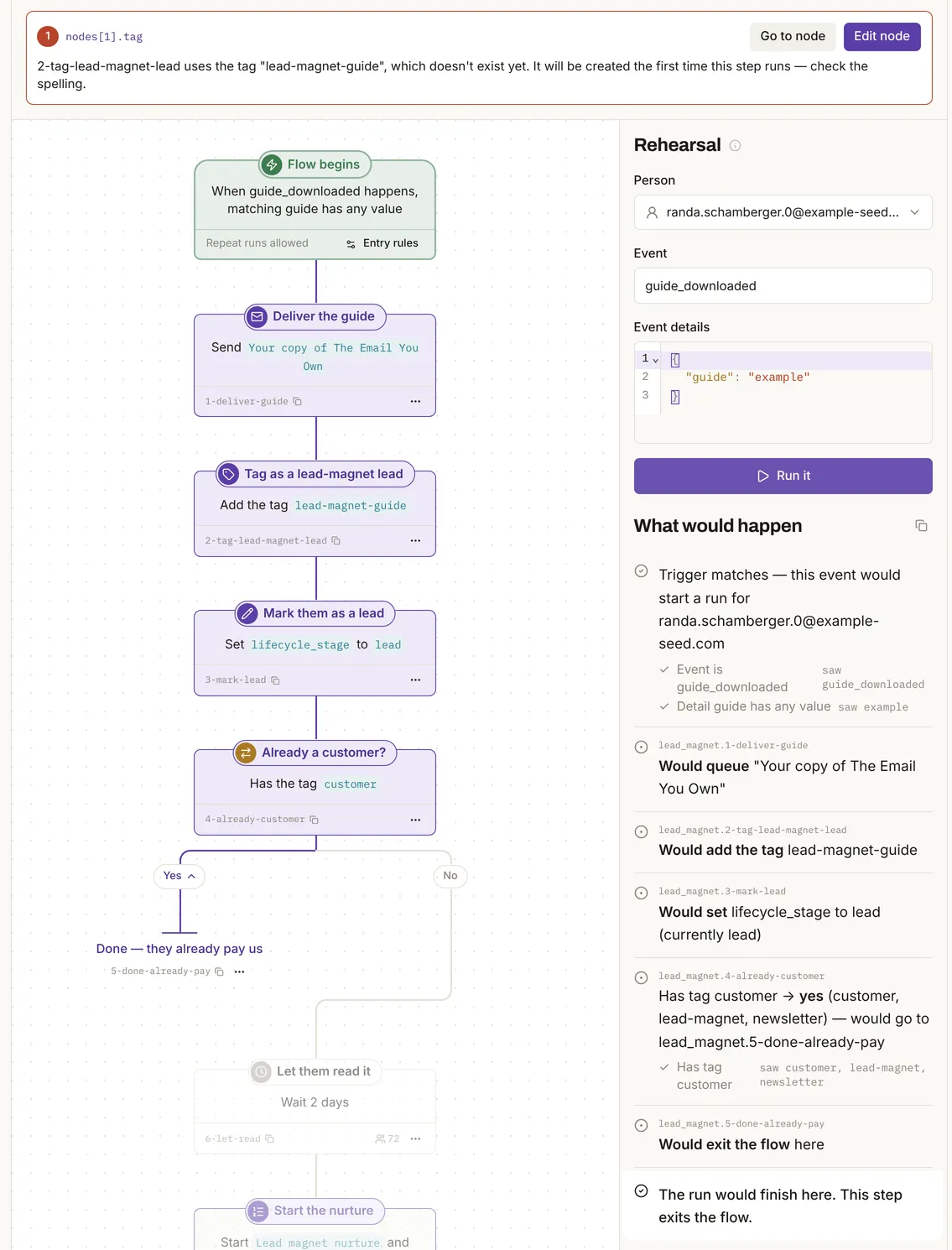
Every check shows the value it saw, and every action is a "would". Nothing is written: in the first test, sends, queue, runs, tags and events matched before and after.
4 Roll back if it's wrong
A checkpoint is only useful if you know where the undo is.
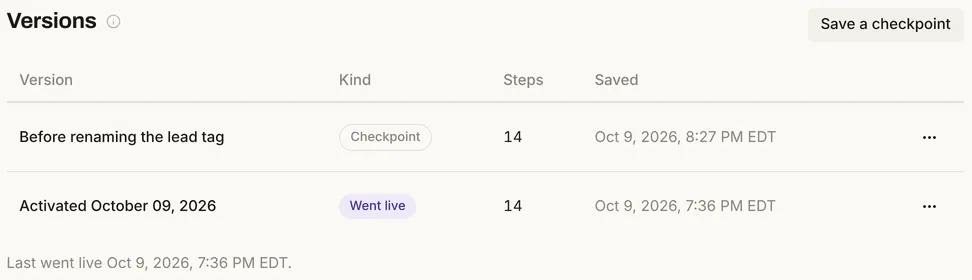
Open the Versions tab, click ⋯ on the checkpoint and choose Roll back to it…. Mimeo re-checks the old definition before it goes live again.
5 Put a guard on emails that must never collide
A guard checks every email as it is about to send, so it catches what no review of one flow can see.
Open Automation → Guards, click New guard, and fill in When the person…, …then and Over which emails. This one keeps sales emails from people who already bought:
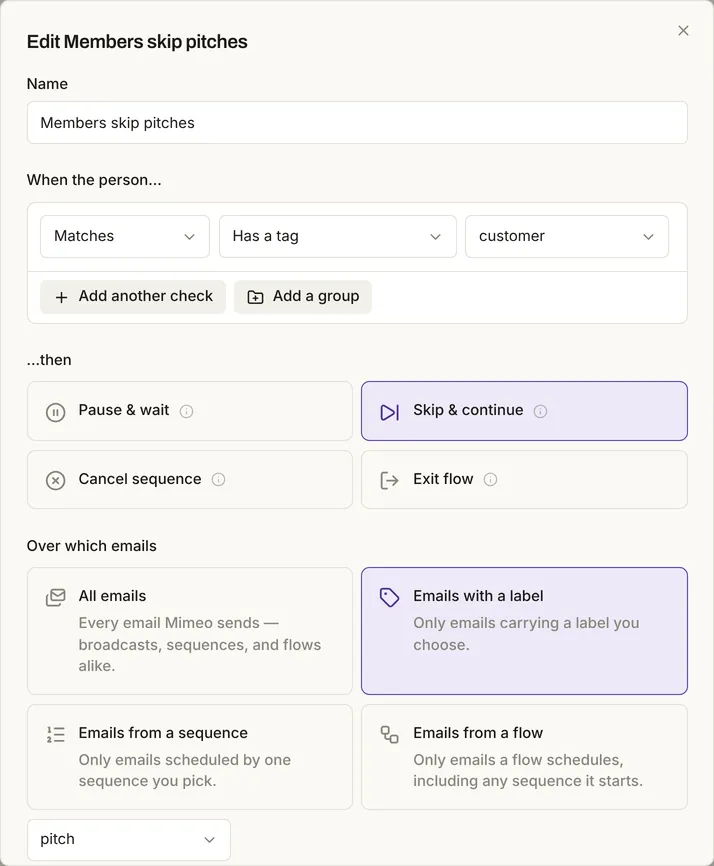
Skip & continue drops that one email and the person carries on. In the first test, a guard like this dropped a tagged person's email while an untagged person's sent.
6 Send a test, not a send
A test send delivers one email to one address, without mailing your list.
Open the email under Content, click Send test, choose an address under Send to, and click Send test.
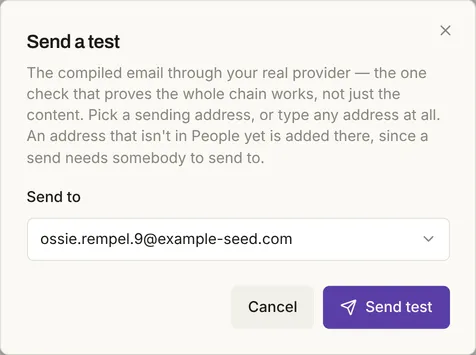
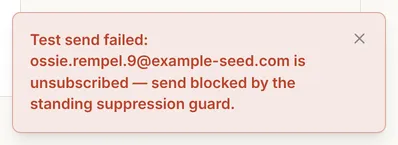
A test moves nobody's sent status or sequence position, and a new address is added to People. Accepted by the provider doesn't mean delivered. Suppression still applies:
7 Keep Make it live your click
A new flow can't mail anyone until someone makes it live.
New flows start as a Draft. When the checks pass, click Make it live; it asks once more: "People will start entering it on matching events."
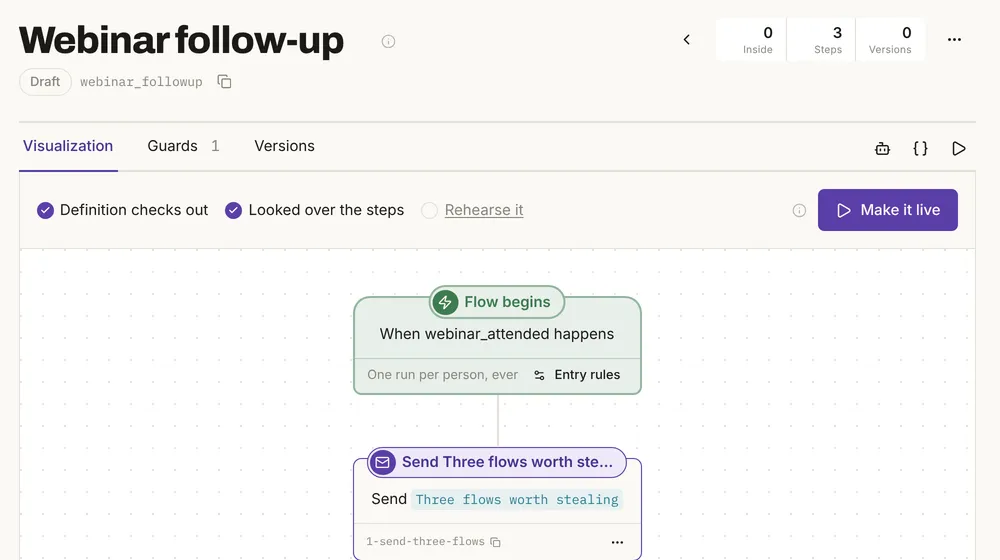
A flow with errors can't be made live at all.
Build it with your agent
1 Write your approval rules into the repo
Your agent reads the repo's instructions every session, so rules written there apply every time.
Add a short section to AGENTS.md called "Before anything goes live" with these rules for working on my Mimeo: pull before every change. Show me the diff and its rehearsals before you push. Dry-run every flow you change against a real person and tell me what would happen. Send test emails only to me. Ask me first, every time, before you activate a flow, schedule or send a broadcast, push past a warning, or push anything that turns a sequence or a sequence step on.
…
- Ask first, every time, before I activate a flow, schedule or send a broadcast, push past a warning, or push anything that turns a sequence or a sequence step on. A yes once doesn't cover the next time.
The rules are instructions to the agent, not settings in Mimeo; see the limits.
2 Ask for the change and read the diff first
A diff and a rehearsal show what a change will do before it reaches anyone.
In the lead magnet flow, tag people lead-magnet-guide instead of lead-magnet. Show me the diff and the rehearsal, but don't push yet.
The lead magnet flow now tags people
lead-magnet-guideinstead oflead-magnet. I've changed it locally and haven't pushed.…
Warning:
lead-magnet-guidedoesn't exist on the Mimeo yet. It gets created the first time the step runs, so check the spelling.…
Decision for you: The segment "Lead-magnet leads who haven't bought" (
segments/lead_magnet_leads.json) still looks forlead-magnet. After the push, new downloaders get the new tag and won't appear in it, and anyone already taggedlead-magnetstays there. I haven't touched the segment. I can switch it tolead-magnet-guide, or match either tag, which also covers existing leads. Which do you want?…
Do you want me to push?
A typo would trigger the same warning. Nothing on your Mimeo changed yet.
3 Approve the push
A push runs diff, validate, rehearse and apply in order and stops at the first that fails, so a bad change never half-applies.
Match either tag in the segment. Then push.
Both changes are pushed, and the follow-up pull found nothing new.
- Flow: The lead magnet flow now adds
lead-magnet-guideinstead oflead-magnet.- Segment: "Lead-magnet leads who haven't bought" now matches either
lead-magnetorlead-magnet-guide.…
I pushed past two warnings that you had already seen, since you said to push.
…
When a check fails, the push is refused and nothing changes: in the first test, a flow pointed at a missing email was refused and kept its real one. To undo a pushed flow, its Versions tab in your Mimeo rolls it back.
4 Rehearse the flow
A rehearsal shows what would happen to one real person if the flow's event arrived now.
Rehearse the lead magnet flow for someone who isn't a customer yet, and tell me what would happen to them.
A non-customer who downloads the guide gets the guide, a lead tag and a 2-day wait, then the 3-email nurture starts. I rehearsed this against Shawnda Brown, who exists on the Mimeo, has no
customertag and has spent $0. Nothing was sent or changed.…
Problem: real downloads may not trigger this flow. The flow only starts when the download event has a
guidevalue. The realguide_downloadedevents I saw in the feed carrypathinstead, for example/blog/email-you-ownand/guides/agents. Shawnda's own real download has onlypath. The rehearsal matched only because it fills in a sampleguidevalue. If your site really sendspath, the flow won't start for those downloads. Some seed events do carryguide, so this may be the site's form versus seed data. Do you want me to check how the site sends the event, or change the trigger to match?…
The rehearsal also caught a trigger that real events may never match, the kind of mistake that sends nothing at all.
5 Put a guard on emails that must never collide
A guard checks every email as it is about to send, so it catches what no review of one flow can see.
Add a guard so people on a trial never get emails labeled pitch.
I've written the guard locally, but it isn't pushed yet. I'm waiting for your OK.
…
It copies the existing "Members skip pitches" guard, which does the same for
customer.…
After a yes, the agent pushed it, and the guard appeared under Automation → Guards as "Trials skip pitches".
6 Send a test, not a send
A test send delivers one email to one address, without mailing your list, and your rules say whose address.
Send a test of "Your copy of The Email You Own" to [email protected].
I haven't sent it. This repo only lets me send test emails to the operator's own address, and [email protected] isn't that.
…
Asked to send it to the operator instead, the agent did, and said the provider accepted it, which doesn't confirm delivery. Mimeo itself refuses a test to an unsubscribed person, whoever asks.
7 Keep Make it live your click
A new flow can't mail anyone until someone makes it live, so keep that click for yourself.
Build a new flow: when someone attends a webinar, send them "Three flows worth stealing", wait two days, then send "Segments that maintain themselves". Keep it a draft.
Following the step 1 rules, the agent showed the diff and a rehearsal and asked before pushing. After a yes:
The "Webinar follow-up" flow is on your Mimeo as a draft. Nobody can enter it, and it has no active runs.
…
Activating is a separate yes from you. Do you want me to activate it?
A push can't make a flow live, and a flow with errors can't be made live at all.
What these checks don't do
They are checks, not a lock: an operator token can still send.
- An operator token can send. The API can send or schedule a broadcast, and the MCP server can schedule one and make a flow live. Nothing in Mimeo stops an agent holding that token; your rules and your review are the approval step.
- Changes apply live. A step saved in the app takes effect at once, and so does a push; a pushed sequence file can turn a sequence or a step on. Only changed flows are rehearsed on a push; sequences, guards and segments are validated.
- A pull overwrites unpushed edits. In the test, the agent pulled mid-change, redid its edit and said so.
- Imported history is quieter, not silent. Events marked historical start no event-triggered flow, but don't cancel sends already scheduled or silence renewal reminders.
- Not tested: Codex, batch sends, real delivery, domain verification and Resend.
How Kit, Brevo and Customer.io handle it
Kit and Brevo keep sending away from the agent, Customer.io previews every write, and Mimeo checks every change and every send.
| Tool | Can the agent send by itself? | What it offers before a change | Source |
|---|---|---|---|
| Kit (MCP) | No: Kit's docs say sending a broadcast always requires explicit user confirmation | Not stated | Kit developer docs |
| Brevo (Claude connector) | No: the connector "will never send or schedule email campaigns" | Drafts saved to your Brevo account for you to review | Claude connector: Brevo |
| Customer.io (Claude connector) | Not stated | A dry-run preview for every write and delete | Claude connector: Customer.io |
| Mimeo (app, manager repo, MCP, API) | Yes, with an operator token | Rehearsals; diff and rehearsal before a push; guards at send time; new flows stay drafts | Tested on a local install, |
If the agent must be unable to send, Brevo's connector leaves sending to you. If you want the agent to run the operation and show you what will happen first, Mimeo fits, and the final send stays yours.
When this isn't the right approach
Three cases call for something else.
Facts, checked
Every changeable fact on this page, with its source and the date it was last checked.
| Fact | Value | Source | Checked |
|---|---|---|---|
| Release tested | Mimeo 0.3.1, CLI 1.2.0 | Release notes | |
| Checkpoints and roll back | Tested: a checkpoint saved under Versions; roll back re-checks the old definition first | Flows | |
| Editing a live flow | Tested: a saved step applies at once; the flow page flags problems | Flows | |
| Diff and rehearsal | Tested: shown before the push; nothing changed until then | CLI | |
| Invalid push | Tested: refused; nothing changed | CLI | |
| Rehearsal | Tested: what would happen; nothing written | Flows | |
| Guard at send time | Tested: tagged email dropped, untagged sent | Guards | |
| Suppression on test sends | Tested: refused | Guards | |
| Test send | Tested: accepted and marked as a test | Emails API | |
| New flows | Tested: pushed as a draft. Documented: errors block Make it live; a push can't make a flow live | Flows | |
| Historical events | Documented: start no event-triggered flow | Events API | |
| What a push can change | Documented: applies live, all or nothing; can turn a sequence on | CLI | |
| Sending by an operator token | Documented: the API sends and schedules broadcasts; MCP schedules them; both make flows live | Broadcasts API, MCP | |
| Sending providers | Postmark, Resend; Amazon SES coming soon; a test provider that delivers nothing | Sending providers | |
| Kit, Brevo, Customer.io | As in the comparison table | Each vendor's page, linked above |
How this was tested
Runs on one local install on October 7 and October 9, 2026, with no real email sent.
- Mimeo 0.3.1 in development, with Claude Code in a Mimeo Manager checkout (CLI 1.2.0). Replies quoted as given; cut lines show "…".
- The app's seed data: 200 people on example-seed.com. No customer data.
- The test provider, and in the first run Postmark's public test token. 0 real sends.
- Table counts read before and after each check in the first run.
Next
The docs cover each check in full.
- Pricing: cost, license and requirements.
- Manager repo: your operation as files, and how to set it up.
- Flows and Guards: rehearsals, versions, going live and send-time checks.
- For your agent: the CLI, the MCP server and the HTTP API.