What an AI agent can do in Mimeo through MCP, API and CLI
Updated · Tested on Mimeo 0.3.1
Mimeo is email automation you own, and an AI coding agent such as Claude Code or Codex can run it through three doors: its MCP server, its HTTP API and the CLI in the manager repo. Your agent can answer questions from live data, check a change before anything is saved, and ship edits as files you review.
Three doors, one Mimeo
Your agent reaches the same Mimeo through three doors, and each one suits a different job.
| Door | Best for | Where it runs |
|---|---|---|
| MCP server | Questions and one-off changes, in conversation | On your Mimeo; nothing to install |
| HTTP API | Your app and your integrations | On your Mimeo |
| CLI | Changes you review as files before they apply | In the manager repo, on your computer |
All three use the same checks as Mimeo's own screens, so they can't disagree about what's valid. A change made through one shows up in the others, and in the web UI, right away.
What your agent can do there
Nearly everything you can do in Mimeo's screens, your agent can do through the MCP server.
- Answer questions about people, segments, events and reports, from your live data.
- Write and check flows, emails, sequences, segments and guards, with a validation and a dry run before anything is saved.
- Change the look of your email: layouts, themes and media.
- Send: create, schedule and cancel broadcasts, and make a flow live.
- Work with files: pull, compare and apply your whole setup, the same files the CLI uses.
The manager repo also ships skills for recurring jobs, such as building a flow from a brief, importing a CSV or tracing an automation that didn't fire. The MCP docs list every tool.
Before you start
You need your Mimeo, a coding agent and the manager repo.
- Your Mimeo, on your server or a local install. See Pricing and Run Mimeo on your own server.
- A coding agent such as Claude Code or Codex.
- The manager repo, connected to your Mimeo. Getting yours sets it up, including the agent's connection to the MCP server.
At the end, your agent answers questions from your live data, checks changes before they're saved, and ships the edits you approve.
Steps
Both tabs do the same six jobs, from giving your agent its token to keeping each send your call.
Build it in Mimeo
1 Create the token your agent will use
Every door except the web UI needs a token, so your agent needs one of its own.
Open Settings → Agents & API. If you use the manager repo, the Manager repo tab's Create a token & show the setup commands makes one for it. For anything else, open API tokens, give the token a name and click Create token. Copy it right away: "Copy this token now — it won't be shown again."
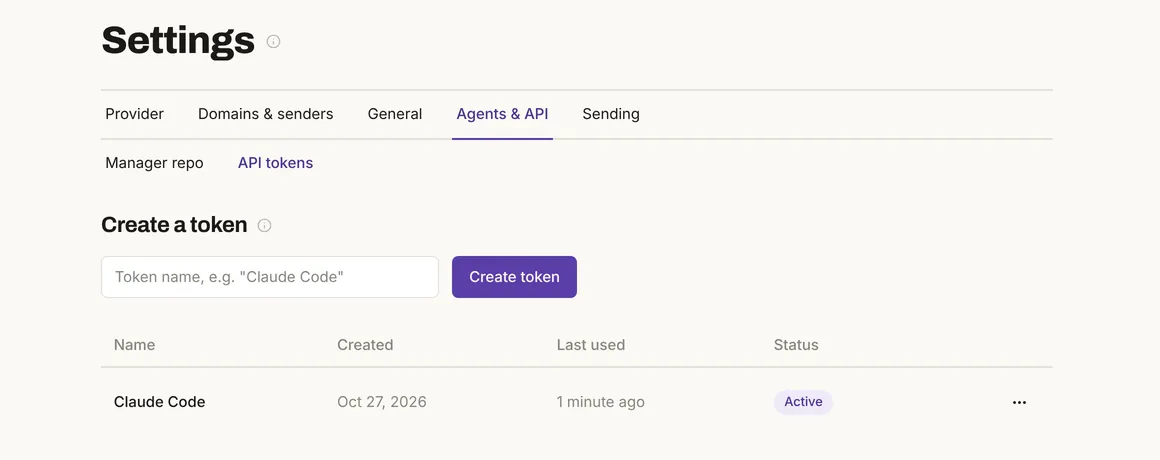
Every token you create here has full access, including sending. In the test, a token made this way connected to the MCP server and answered at once.
2 Ask a question
Your agent reads the same live numbers you see on a segment's page.
Open a segment under People. Its page shows how many people match, and a segment marked Should be empty warns you when anyone does.
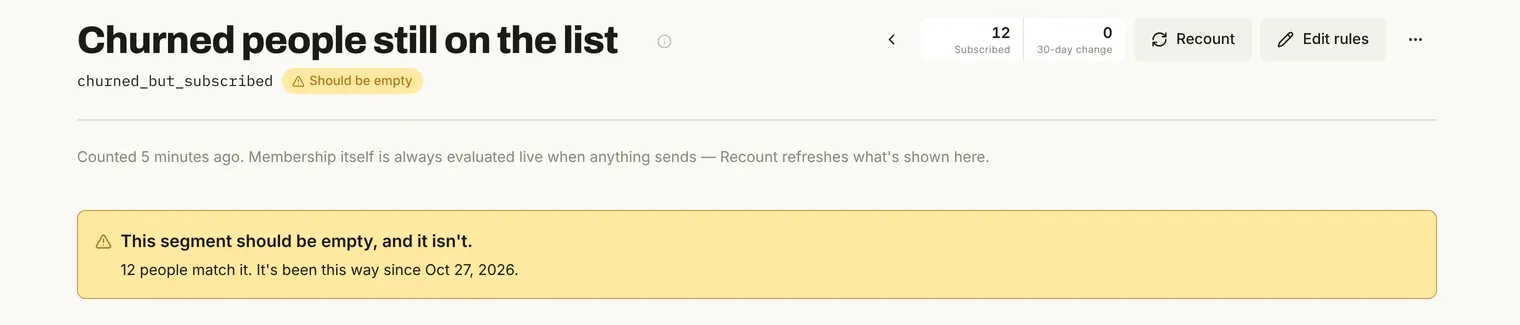
In the test, this segment held 12 seed people. Asked over MCP, Mimeo gave the agent the same 12 and said the warning had tripped.
3 Check how a broadcast did
A broadcast's report is one place to read delivery and engagement together.
Open Reporting and choose the broadcast.
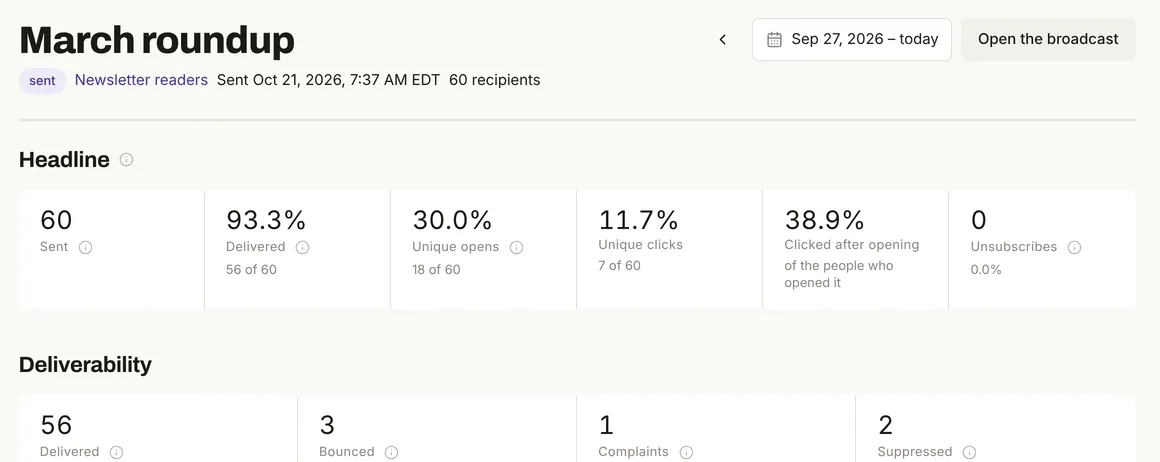
Your agent gets the same numbers over MCP, plus the clicks on each link. The test broadcast's numbers are seed data, not a real list.
4 Check a change before you save it
The safest change is one you've seen for a real person before it goes anywhere.
Open the email under Content and switch to Preview: it shows the email as the chosen person will get it. The side panel shows everywhere the email is used, so you know what an edit will reach.
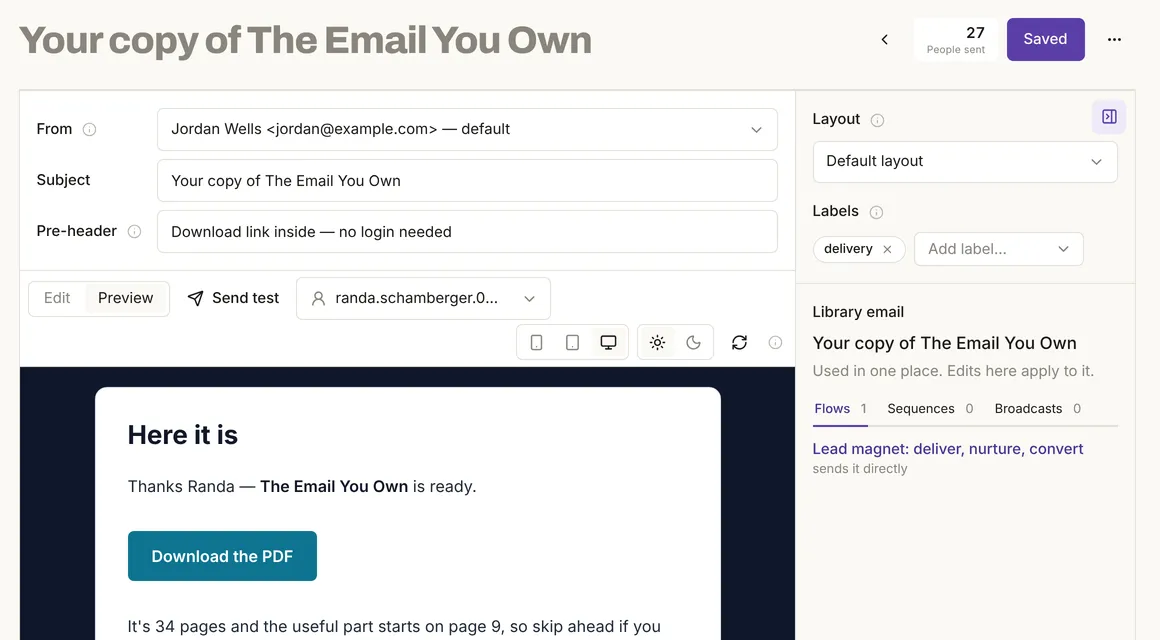
For a flow, a rehearsal shows what would happen to one person, and writes nothing. Test a flow before it sends to real subscribers covers it.
5 See what your agent changed
Whatever your agent changes shows up in Mimeo's screens, so you can always look.
A flow your agent pushes arrives as a Draft: nobody enters it until you click Make it live. Other changes appear at once on the pages they touch.
6 Watch and revoke tokens
A token you no longer use is a door left open.
On API tokens, Last used shows when each token last did something. To close one, choose Revoke… from its ⋯ menu.
Build it with your agent
1 Connect your agent
The manager repo connects your agent to your Mimeo's MCP server, so there's nothing else to install.
Set up the repo with Getting yours. Its .mcp.json points at your Mimeo and reads the token from your environment, never from a committed file. Then open your agent in the repo.
Which Mimeo tools can you use? Group them by what they do, and don't change anything.
What to look for: groups for flows, emails, segments, people, broadcasts, reports and files. If your agent finds no Mimeo tools, check that the token is in its environment.
2 Ask a question
Your agent answers from your live data, not a copy.
How many people are in the segment of churned customers who are still on the list, and should there be any?
What to look for: the count, and whether the segment's "should be empty" warning has tripped. In the test, Mimeo answered with "Churned people still on the list": 12 people, should be empty, tripped.
3 Check how a broadcast did
One question gets you delivery, engagement and links together.
How did the March roundup broadcast do? Include bounces, complaints and which links were clicked.
What to look for: sent, delivered, bounces, complaints, opens, clicks and the clicks on each link. In the test, the seed broadcast had 60 sent, 56 delivered, 3 bounces, 1 complaint, 18 unique opens and 7 unique clicks, 4 on one link and 3 on the other.
4 Check a change before it's saved
Your agent can check a change without saving it, and show you an email as one real person will get it.
In the lead magnet flow, point the first step at a different email, but validate the change before you save anything, and show me that email as one real subscriber would see it.
What to look for: a validation result before any save, and a preview with the person's name filled in. In the test, an edit pointing at an email that doesn't exist came back "1-deliver-guide sends email #99999, which does not exist", and the saved flow was untouched. An unsaved draft previewed as "Hi Randa," with no tracking added.
5 Ship it as files you review
Changes that deserve a record go through the files, where you see the diff first.
Make that change in the files and show me the diff before you push.
What to look for: the diff, a validation and a rehearsal, and nothing applied until you say yes. In the test, a segment edit showed "rules changed" in the diff, and saying no at the push prompt printed "Left alone." with your Mimeo unchanged.
6 Keep each send your call
Mimeo lets a full-access token send, so the rule to ask first has to live with your agent.
Add a rule to AGENTS.md: ask me first, every time, before you schedule or send a broadcast, make a flow live or push past a warning.
What to look for: the rule written into the repo, and your agent asking before those steps. In an earlier test, Claude Code following rules like these showed the diff, a warning and a rehearsal, and asked before pushing. Let an AI agent run your email without accidental sends has the full set of checks.
Limits
The tests ran on a local install with seed data, and some of the agent's side was not run.
- No agent ran the prompts. The MCP calls came from a test client sending the requests an agent sends, not from Claude Code or Codex, so each prompt shows what to look for, not a captured reply.
- Every token has full access, including sending. There's no read-only agent token today.
- No "read-only" or "risky" labels. Mimeo doesn't label its MCP tools that way, so whether your agent asks before scheduling a broadcast depends on its own approval settings and your written rules.
- Not exercised: tools that save, schedule or send, the API's write endpoints, Cursor and a production install.
How Mimeo's MCP server differs
Mimeo's MCP server runs on your own Mimeo and goes through the same checks as everything else.
- It runs on your server, at
/mcp, with nothing to install, and its tools match the version your Mimeo runs. - It tells your agent how to start: read your setup's own vocabulary first, then validate and dry-run a flow before saving it.
- It uses the same checks as the API, the CLI and the web UI.
- It turns away requests with no token, integration tokens and requests from other websites' pages.
When not to use this
Three cases call for something else.
Facts, checked
Every changeable fact on this page, with its source and the date it was last checked.
| Fact | Value | Source | Checked |
|---|---|---|---|
| Release tested | Mimeo 0.3.1, CLI 1.2.0, MCP server 1.0.0 | Release notes | |
| Three doors | MCP server and HTTP API on your Mimeo; CLI in the manager repo | How it fits together | |
| MCP token | Tested: needs a full-access operator token; integration tokens are refused | MCP server | |
| What MCP covers | Tested: flows, emails, layouts, themes, media, sequences, segments, guards, settings, broadcasts, people, events, reports and files | MCP server | |
| Live answers | Tested: segment counts and warnings, broadcast reports and a person's record, the same as the web UI shows | MCP server | |
| Checks before a change | Tested: validation and preview of unsaved changes; nothing saved | MCP server | |
| What MCP refuses | Tested: no token, integration tokens and other websites' pages | MCP server | |
| Tool labels | Tested: no read-only or destructive labels on any tool | MCP server | |
| Tools match your version | Documented | MCP server | |
| Tokens you can create | Tested: full access, including sending; shown once; Last used and Revoke | HTTP API | |
| CLI and MCP | Tested: the same files; diff before a push; a declined push changes nothing | CLI | |
| Pushed flows | Tested: arrive as a draft until you make them live | Flows | |
| Sending with a full-access token | Documented: MCP schedules broadcasts and makes flows live; Mimeo doesn't block it | MCP server, Broadcasts API | |
| Agent following written rules | Tested once with Claude Code: it showed its checks and asked before pushing | Agent-safe guide | |
| Skills in the manager repo | Documented: skills for recurring jobs, such as building a flow or importing a CSV | Manager repo |
How this was tested
On one local install of Mimeo 0.3.1 with its seed data (200 people on example-seed.com), on October 26 and 27, 2026. A test client connected to the MCP server and made the same requests an agent makes; the HTTP API was called with a full-access token and an integration token; the CLI connected from a copy of the manager repo, showed a diff and was told no at the push prompt. The web UI captures came from the same install. No email was sent and no data changed, apart from the token created for Fig. 2.
Next
The docs cover each door in full.
- Pricing: cost, license and what you need to run Mimeo.
- How it fits together: the map of the web UI, API, CLI and MCP server.
- MCP server, HTTP API and CLI: every tool, endpoint and command.
- Manager repo: where your agent works.
- Let an AI agent run your email without accidental sends: the checks to set up before your agent changes anything.