Test a flow before it sends to real subscribers
Updated · Tested on Mimeo 0.3.1
To test a flow before it sends to real subscribers, rehearse it in Mimeo for a real person: the rehearsal shows each check with the value it saw and every step it would take, and writes nothing. Then preview each email as that person, send yourself a test, and make the flow live only when its checks pass.
What a flow test covers
Four checks, each answering a different question, and only one of them sends anything.
| Check | What it answers | Writes anything? |
|---|---|---|
| Rehearsal | Who would get what, and why | No |
| Preview | What this email says to this person | No |
| Test send | Does it arrive | One email, marked as a test |
| Going live | Is the flow sound | No; errors block it |
Flows that start before a subscription renews or ends have no event to rehearse; for those, Preview upcoming shows who they would enter. The flow page calls the first check a rehearsal; the docs, API and MCP call it a dry run. It is the same check.
Before you start
You need a saved flow and a few real people to test it with.
- Your Mimeo, with the flow saved, as a draft or live.
- A few people from People who should each take a different path.
- A sending provider: Postmark or Resend (Amazon SES is coming soon), or the built-in test provider, which records sends and delivers nothing.
- For the agent tab: Claude Code or Codex, working in your manager repo (Getting yours sets it up).
At the end, every path is rehearsed, each email is checked for a real person, a test has gone to you, and the flow goes live with its checks passing.
Steps
Both tabs test the Trial journey flow from Mimeo's demo data: customers get a tag and leave; everyone else gets the Welcome sequence, a 40-day wait, then a pitch if they visit the pricing page.
Build it in Mimeo
1 Pick one person for each path
A rehearsal uses the person's real tags, fields and history, so the person decides the path.
Open People and search. For Trial journey, note one customer and one person who isn't.
2 Rehearse the flow for the first person
A rehearsal shows what would happen to this person if the flow's event arrived now.
On the flow's page, click Rehearse it (the play icon above the canvas). In the Rehearsal panel, choose the Person, check the Event and Event details, and click Run it.
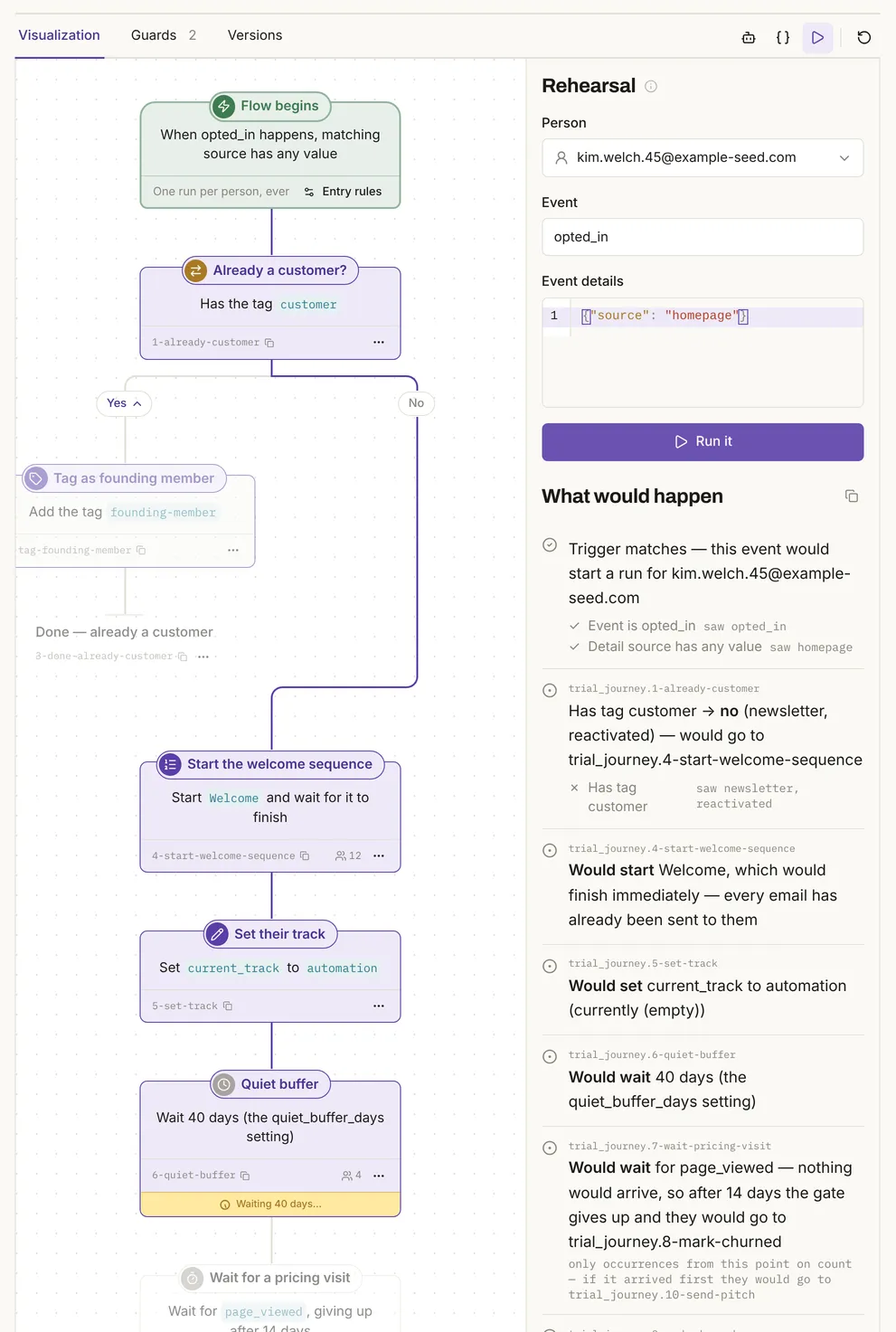
Under What would happen, each check shows the value it saw: "Has tag customer → no (newsletter, reactivated)". Waits are walked through ("Would wait 40 days (the quiet_buffer_days setting)"), and a wait with a time limit is shown as if nothing arrives: "nothing would arrive, so after 14 days the gate gives up". The diagram lights the path. Nothing is written: in the test, sends, queue, runs, tags and events matched before and after.
3 Rehearse it for someone who should go the other way
Two people on the same event should take two paths; check both.
Choose the customer in Person and click Run it again.
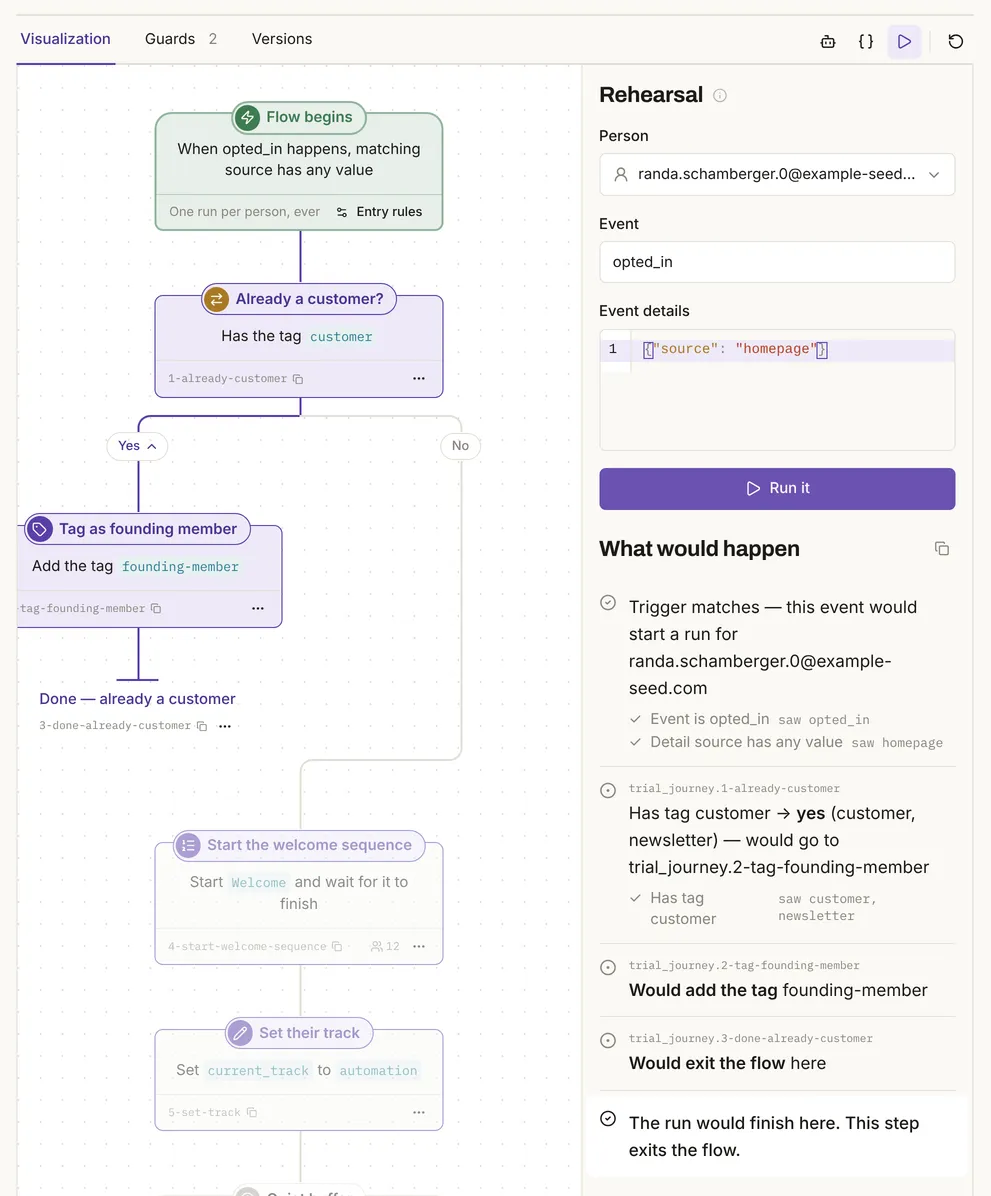
This time: "Has tag customer → yes (customer, newsletter)", "Would add the tag founding-member", "Would exit the flow here".
4 Check what makes it do nothing
A flow that silently skips people is as wrong as one that mails the wrong ones.
Run it once with the Event details emptied, and once for someone who already went through a flow that runs once per person.
In the test, the first said "Trigger does not match — nothing would happen", with the failing check "Detail source has any value" and the value it saw, (empty). The second said the person "has already had their run, so no run would actually start".
5 Preview each email as that person
A preview shows the email this person would get, with their name and details filled in.
Open the email under Content, switch Edit to Preview, and pick the person. The buttons above it switch to phone width and dark mode.
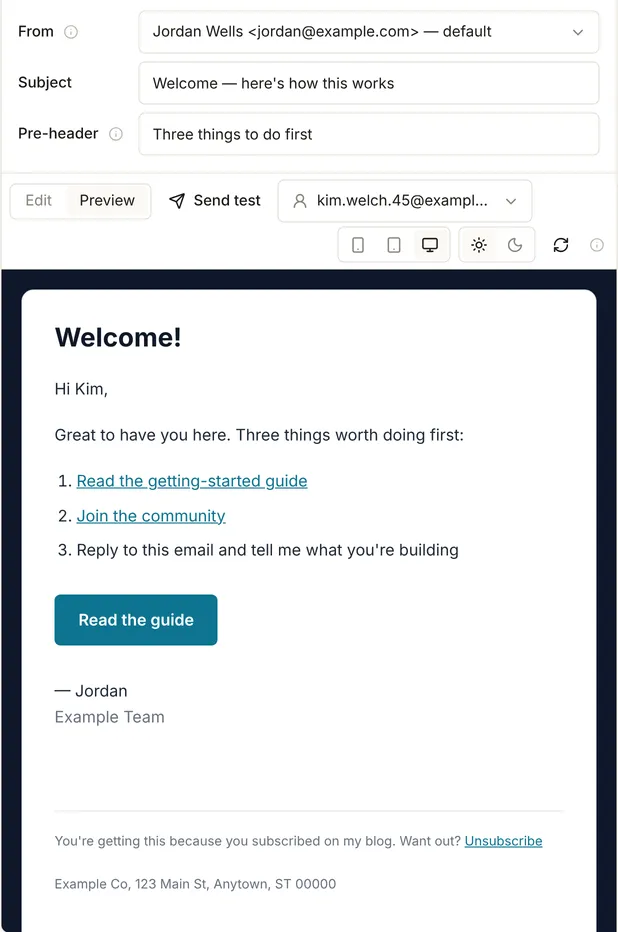
The greeting reads "Hi Kim,". Nothing is sent.
6 Send yourself a test
A test send is the one check that goes through your sending provider.
In the email, click Send test, choose your address under Send to, and click Send test.
With Postmark or Resend it lands in your inbox. It is marked as a test, so nobody's sent status or place in a sequence moves. With the test provider it is recorded and delivered nowhere: in the test, Mimeo recorded one sent email marked as a test, and the person's real sends stayed at 8. A test to someone who unsubscribed is refused; the agent-safe guide shows both dialogs.
7 Preview who a renewal or ending flow would enter
A flow that starts before a subscription renews or ends has no event to rehearse, so preview who it would enter instead.
On the flow's first step, click Entry rules. In How people enter this flow, click Preview upcoming.
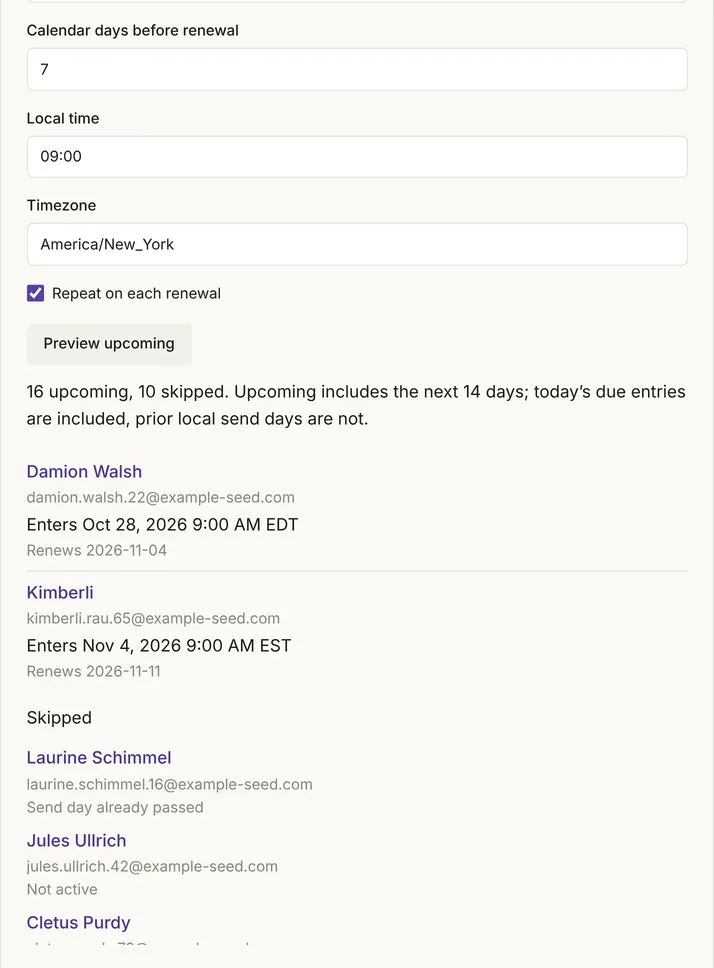
The draft reminder showed "16 upcoming, 10 skipped": each person with the time they would enter, and each skipped person with a reason ("Send day already passed", "Unsubscribed", "Not active"). The preview covers the next 14 days, works on a draft and writes nothing.
8 Fix what the checks flag
Mimeo checks a flow each time it changes and won't let one with errors go live.
Above the canvas, the flow page shows "Definition checks out" or how many problems are left to fix. Each problem names the step and what is wrong, with Go to node and Edit node beside it.
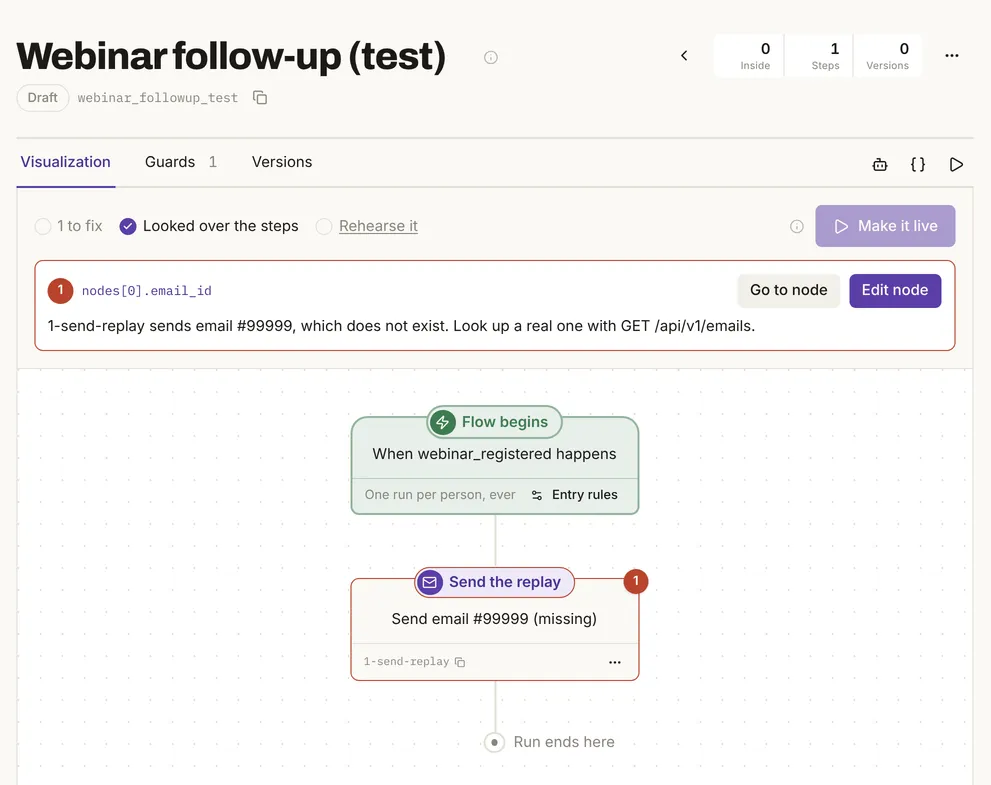
Until the problem is fixed, Make it live stays disabled. Warnings, such as a tag that doesn't exist yet, don't block.
9 Make it live, and know how to stop it
Going live is the only step that lets the flow mail anyone, so it stays your click.
Click Make it live. Mimeo checks the flow again, and each time it goes live it records a version under Versions to roll back to. To stop it, switch Live off at the top of the flow's page: nobody new enters or moves on, and its queued emails wait until you switch it back on.
Build it with your agent
1 Ask for one person per path
Your agent can read the flow and your people, and pick test subjects with a reason for each.
Read the trial journey flow and pick three real people from my Mimeo to test it with: one customer, one who isn't, and one who has already been through it. Tell me why you picked each.
What to look for: real people, each with the tag or history that decides their path.
2 Rehearse it for the first person
Rehearse the trial journey flow for the person who isn't a customer, with the event it starts on, and show me the whole trace. Don't change anything.
What to look for: the trigger check, each condition with the value it saw, and every action as a "would". In the test, the customer check read "Has tag customer → no (newsletter, reactivated)".
3 Rehearse it for the other path
Now rehearse it for the customer and tell me where the two paths split.
What to look for: the customer check answering yes, then "Would add the tag founding-member" and "Would exit the flow here".
4 Ask what makes it do nothing
Rehearse it for the person who has already been through it, and once more with the event details empty. Tell me why nothing would happen in each case.
What to look for: "Trigger does not match — nothing would happen" for the empty event, and the note that the person "has already had their run".
5 Preview the emails
Preview the Welcome email as the person who isn't a customer. Tell me how the greeting and the links come out.
What to look for: the email with their details filled in. In the test, it began "Hi Kim,". Nothing is sent.
6 Send a test to yourself
Send a test of the Welcome email to me, and only to me.
What to look for: in the test, the API answered "Accepted by the provider. Acceptance isn't delivery." Check your inbox to know it arrived.
7 Preview a renewal or ending flow
Show me who the renewal reminder flow would enter in the next 14 days, and why anyone is skipped. Don't make it live.
What to look for: each person with the time they would enter, and each skipped person with a reason.
8 Rehearse a change before it is saved
Your agent can rehearse a change before saving it, which the flow page can't.
I want the founding-member tag renamed to founding-members. Rehearse that change for the customer before you save it, and show me the trace and any warnings. Don't save it yet.
What to look for: the trace using the change ("Would add the tag founding-members") and any warning. In the test, a new tag came back with "…doesn't exist yet. It will be created the first time this step runs — check the spelling."
9 Make it live when you say so
Check the flow for problems and tell me anything that would stop it going live. If it's clean, wait for my yes before you make it live.
What to look for: a flow with errors is refused. In the test, the API answered "This flow has 1 problem to fix before it can go live.", and the flow stayed a draft. The flow API docs and the MCP server cover each check.
What a rehearsal doesn't check
A rehearsal checks the flow's logic for one person as things stand now, not whether each email would actually send.
- Unsubscribes, guards and send windows act when each email sends, not in a rehearsal. In the test, a rehearsal for someone who had unsubscribed still read "Would start Welcome (2 emails to send)"; at send time, Mimeo would have dropped those emails. Guards cover the checks at send time.
- A wait with a time limit is rehearsed as if nothing arrives, so the trace follows the path for giving up.
- Sequences and broadcasts aren't rehearsed; preview and test-send their emails.
- Unsaved changes: the flow page rehearses the saved flow. Your agent can rehearse a change before it is saved.
- The test provider proves nothing about delivery; only a test through Postmark or Resend does.
- Not tested: real delivery, pausing a live flow, rolling back a version, or MCP over its own connection. Every check ran on demo data, not a real list.
Inbox testing tools test the email, not the flow
Mailtrap, Litmus and Mailosaur check the email itself; a rehearsal checks who gets which email, and why.
| Tool | What it checks | Source |
|---|---|---|
| Mailtrap Email Sandbox | Captures "SMTP traffic from staging and dev environments", checks spam score and HTML/CSS, and "is not designed to deliver emails to real email addresses" | Mailtrap: Email Sandbox |
| Litmus | Previews "100+ popular email clients—including Dark Mode" and checks "links, images, tracking, and other critical elements before you send" | Litmus: Email testing |
| Mailosaur | Test addresses for testing "email and SMS end to end", with any testing framework such as Cypress, Playwright or Selenium | Mailosaur |
| Mimeo | Rehearses a flow for a real person, refuses a flow with errors, and previews and test-sends each email | Tested on a local install, |
They work alongside a rehearsal. Use one when the question is how an email renders across mail clients, or whether your own app's sending code works.
When not to use this
Three questions need a different check.
Facts, checked
Every changeable fact on this page, with its source and the date it was last checked.
| Fact | Value | Source | Checked |
|---|---|---|---|
| Release tested | Mimeo 0.3.1 | Release notes | |
| Rehearsal | Tested: each check with the value it saw, every action as a "would"; nothing written | Flows | |
| Different people, different paths | Tested: a customer and a non-customer took different paths on the same event | Flows | |
| When nothing would happen | Tested: a trigger that doesn't match, and a person who already had their run, are named | Flows | |
| Rehearsing an unsaved change | Tested through the API: the change is rehearsed and its warnings returned; nothing saved. The flow page rehearses the saved flow | Flows API | |
| What a rehearsal skips | Tested: unsubscribes, guards and send windows aren't applied; they act at send time | Guards | |
| Preview | Tested: the email for one chosen person; nothing sent | Emails | |
| Test send | Tested: recorded and marked as a test; nobody's sent status moves | Emails | |
| Test send to an unsubscribed person | Tested: refused | Guards | |
| Renewal and ending preview | Tested on a renewal draft: who would enter in the next 14 days, and who is skipped and why. Ending: documented | Flows | |
| A flow with errors | Tested: Make it live disabled; the API refuses it. Warnings don't block (documented) | Flows | |
| Versions and pausing | Documented: each go-live records a version; pausing holds queued emails | Flows | |
| Sending providers | Postmark, Resend; Amazon SES coming soon; a test provider that delivers nothing | Set up sending | |
| Mailtrap, Litmus, Mailosaur | As in the comparison table | Each vendor's page, linked above |
How this was tested
Runs on one local install on October 26 and 27, 2026, with no real email sent.
- Mimeo 0.3.1 in development, with the app's demo data: 200 people on example-seed.com. No customer data.
- Eleven checks through the HTTP API on October 26, with table counts read before and after each; the screens captured on October 27. Output quoted as given; cut lines show "…".
- The test provider: 0 real sends. Rehearsals, previews, problem checks and the renewal preview changed 0 rows; the test send recorded one sent email marked as a test.
- The agent prompts were not run with a coding agent.
Next
The docs cover each check in full.
- Pricing: cost, license and requirements.
- Flows: rehearsals, going live, versions and renewal triggers.
- Emails: preview and send test.
- For your agent: the MCP server and the Flows API.