Move from Mailchimp or Kit without emailing people who opted out
Updated · Tested on Mimeo 0.3.1
To move from Mailchimp or Kit to Mimeo without emailing anyone who opted out, export your unsubscribed, bounced and complained contacts as their own file and import it first with Import everyone as already unsubscribed on. Then import your active list with history left on. Mimeo never resubscribes an opted-out address, and the import triggers nothing.
Before you start
You need a working Mimeo and your old tool's exports, and at the end your whole list is in Mimeo with every opt-out suppressed and no flow started.
- Your Mimeo, on your server, with a sending provider connected: Postmark or Resend (Amazon SES is coming soon). Getting started covers both.
- Your exports. In Mailchimp, only Owners and Admins can export an audience.
- A plan for who sends what during the move, so nobody gets the same newsletter from both tools. Migrating from another email platform covers the plan, the three-newsletter transition and the cutover; this guide covers getting the list in.
- For the agent tab: a coding agent such as Claude Code or Codex, working in your manager repo.
At the end, everyone keeps their original subscribe date and tags, everyone who opted out stays opted out, and none of your automations has fired.
Steps
Both tabs move the same Mailchimp list, plus a Kit-style file, in the same order: opt-outs first, then the active list, then a check.
Build it in Mimeo
1 Export everything, including the opt-outs
The opt-outs are the part that protects you, so they need to come over as well as the people you'll mail.
Mailchimp: open Audience, click Export audience, then Export CSV in the "Export all contacts?" pop-up. Mailchimp says the export may be a ZIP with a separate file for each kind of contact: subscribed, unsubscribed, non-subscribed and cleaned. Cleaned contacts are addresses that hard bounced or repeatedly soft bounced. Exports stay in your account for 30 days, and archived contacts export separately. Mailchimp itself advises keeping subscribed, unsubscribed and cleaned contacts in separate groups when you import them elsewhere.
Kit: every subscriber has a state: active, inactive, bounced, complained or cancelled. Export everyone who isn't active as well as your active subscribers, and treat all of those as opt-outs. Kit explains its export in How to export subscribers in Kit.
Keep the files somewhere safe and outside your manager repo: they hold your subscribers' addresses.
2 Import the opt-outs first
Opt-outs imported first stay opted out through everything you import after them.
On People, click Import CSV, choose your unsubscribed file and click Upload and map. Map the email column to Email and the sign-up date to Subscribed on. Under Tags to add to every row, add a tag that says where these people came from, such as from-mailchimp. Tick Import everyone as already unsubscribed, click Save mapping, check the Preview, then click Start import.
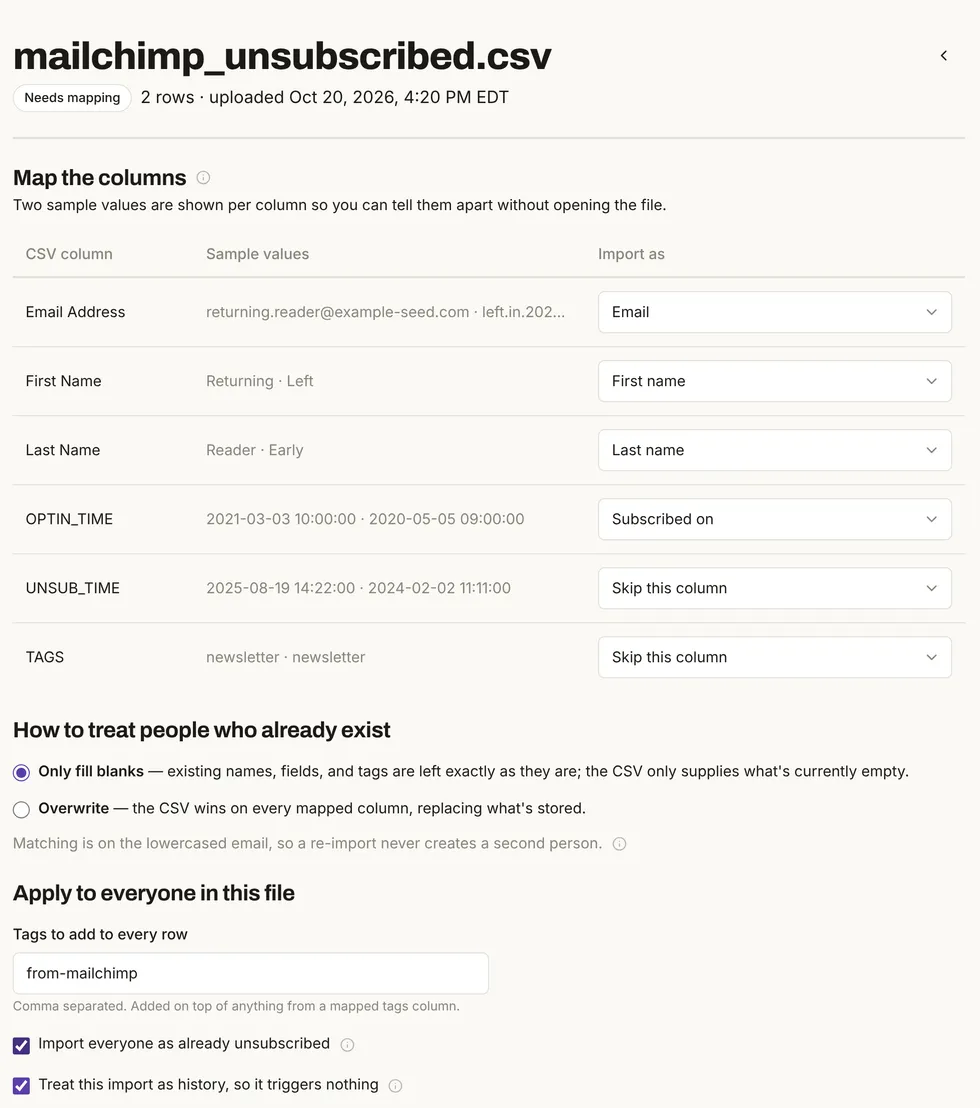
In the test, the unsubscribed file created 2 people and the cleaned file 1, and all 3 arrived unsubscribed. Do the same for Mailchimp's cleaned file and for Kit's non-active subscribers. Each person's unsubscribe date becomes the date of the import, and Mimeo doesn't record whether they bounced or complained, so keep your original files for your records.
3 Import your active list with history on
The active list brings your subscribers' dates and tags, and the history switch keeps it from starting your automations.
Start a new import with the subscribed file. Map the email and name columns, the sign-up date to Subscribed on (in Mailchimp's file that's OPTIN_TIME, the time a contact accessed your signup form) and the tags column to Tags. Under Tags to add to every row, add from-mailchimp and a tag for this batch, such as migration-wave-1. Leave Treat this import as history, so it triggers nothing ticked. Save, check the preview and start the import.
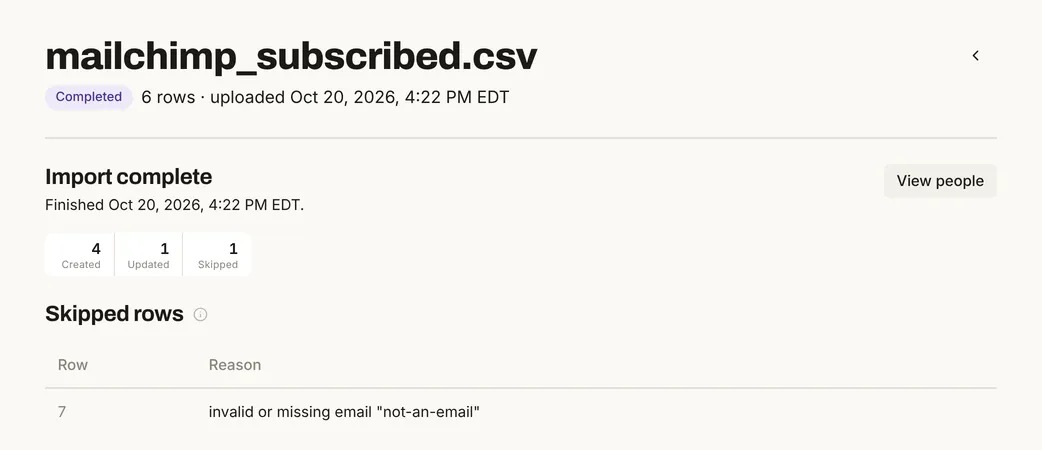
The report counts what happened to every row: 4 people created, 1 updated and 1 skipped, with the row number and reason. A bad row doesn't stop the rest of the file. The preview doesn't check addresses, so it listed that row as "create" before the import skipped it.
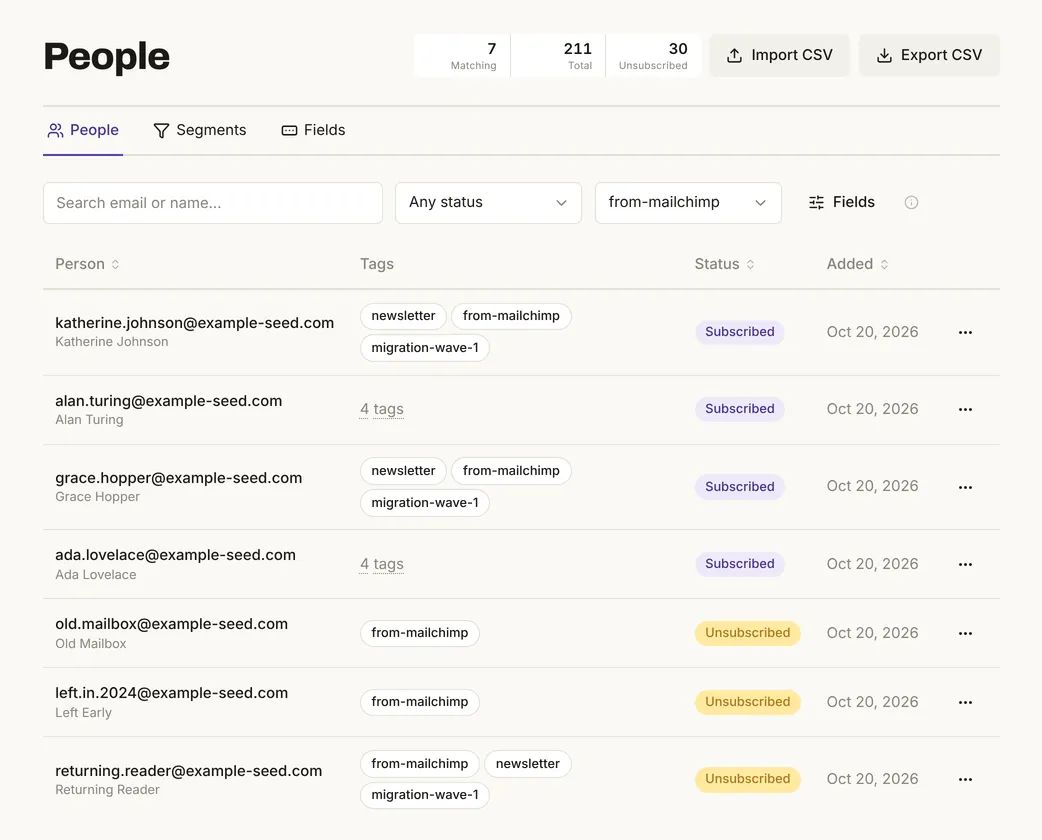
The 1 updated person had also been in the unsubscribed file. The import added the new tags and left them unsubscribed:
Nothing was set off. The test had an active flow that sends a welcome email when someone gets the newsletter tag. This import gave 5 people that tag and the flow started 0 times. With the history switch off, one new signup with the same tag started the flow and queued its email.
4 Don't map a status column to Already unsubscribed
Mimeo reads only a few words in that column as "unsubscribed", and Kit's status words aren't among them.
A column mapped to Already unsubscribed suppresses a row only when it says true, 1, yes, y, t, x or unsubscribed, or holds a date. Any other word imports the person as subscribed, and the report shows no error. In the test, a Kit-style file had one person in each state:
| Import | Created | Updated | Skipped | Unsubscribed after |
|---|---|---|---|---|
4 rows, status (active, cancelled, bounced, complained) mapped to Already unsubscribed |
4 | 0 | 0 | 0 of 4 |
| The 3 non-active rows as their own file, with Import everyone as already unsubscribed | 0 | 3 | 0 | 3 of 4 |
Until the second import, the cancelled, bounced and complained subscribers could have been mailed. Split anyone who isn't active into their own file and import it first, as in step 2. If you must use one file, change those words to yes before you import.
5 Check that nobody who opted out can be mailed
One filter shows who came over and whether they can be mailed.
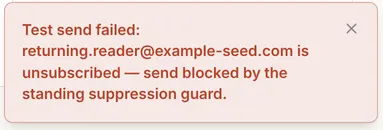
On People, pick your provenance tag in the tag filter, as in Fig. 3, and read the Status column. To prove the guard, open any email under Content, click Send test and send it to an imported opt-out:
Broadcasts leave unsubscribed people out too: in the test, a segment of all 11 imported people would have sent to 5. From here, follow the three-newsletter transition and cut over in one direction.
Build it with your agent
1 Export everything, including the opt-outs
The agent can't log in to Mailchimp or Kit for you, so the exports are yours to make.
Export as in the other tab: Mailchimp's Audience → Export audience → Export CSV, and for Kit, your active subscribers plus everyone who is inactive, bounced, complained or cancelled. Save the files outside your manager repo and give your agent their paths.
2 Import the opt-outs first
Your manager repo's import skill reads the file before uploading anything, proposes the mapping and a provenance tag, and asks before it commits.
Import ~/exports/mailchimp-unsubscribed.csv into my Mimeo as already unsubscribed, before anything else, with the tag from-mailchimp. Then do the same with mailchimp-cleaned.csv. Show me the mapping and the preview before you commit either one.
The skill asks "Commit this import?" and waits for your yes. Nothing is written before then.
3 Import your active list with history on
Ask for the dates, the tags and a report of anyone who opted out.
Import mailchimp-subscribed.csv with history on: OPTIN_TIME as Subscribed on, the TAGS column as tags, and from-mailchimp and migration-wave-1 on every row. After it runs, tell me how many were created, updated and skipped, give me the line number and reason for each skipped row, and tell me whether anyone who unsubscribed would be resubscribed.
The answer to the last question is no: an import never resubscribes anyone. Asking makes the agent check it against your Mimeo.
4 Don't map a status column to Already unsubscribed
Tell the agent to split the opt-outs, because Kit's status words import as subscribed.
This Kit export has a status column. Don't map it to Already unsubscribed. Put everyone who isn't active into their own file and import that first as already unsubscribed with the tag from-kit, then import the active subscribers.
5 Check that nobody who opted out can be mailed
Ask for the numbers rather than a reassurance.
Look at everyone tagged from-mailchimp or from-kit. How many are subscribed and how many are unsubscribed? Check a few of the unsubscribed ones against my original files, and tell me how many people a broadcast to all of them would actually reach.
Mimeo refuses a test send to an unsubscribed person, whoever asks, so even a mistaken request can't reach them. For agents working through the API directly, the Imports API has the same switches.
Limits
The test proves the order and the switches, not your files.
- Small stand-in files. The test used files of up to 6 rows shaped like the exports, on test addresses, not real Mailchimp or Kit exports. Kit's export page couldn't be read for this guide, so its steps here are general.
- Some history stays behind. With the whole-file switch, the unsubscribe date becomes the import date and bounce or complaint reasons aren't kept. Mailchimp's contact export has no opens or clicks.
- Automations don't move. Rebuild flows, sequences and emails in Mimeo; nobody's place in an old automation carries over. The history switch doesn't cancel mail that's already queued.
- The agent tab's prompts weren't run. They follow the manager repo's import skill; the same imports ran in the web UI and through the API.
When not to use this
This order fits most moves; four situations call for something else.
Facts, checked
Every changeable fact on this page, with its source and the date it was last checked.
| Fact | Value | Source | Checked |
|---|---|---|---|
| Release tested | Mimeo 0.3.1 | Release notes | |
| Import everyone as already unsubscribed | Tested: every row suppressed; unsubscribe date is the import date | CSV import | |
| Opted-out people in a later import | Tested: tags added, still unsubscribed | CSV import | |
| Status words in Already unsubscribed | Tested: true, 1, yes, y, t, x, unsubscribed or a date suppress; Kit's words don't, with no error |
CSV import | |
| History switch | Tested: on by default; an active tag-started flow ran 0 times with it on, 1 with it off. Documented: doesn't cancel queued mail | CSV import | |
| Subscribe dates and tags | Tested: sign-up dates and tags carried over; tags added to every row. Documented: only an earlier date replaces a stored one | CSV import | |
| Import report | Tested: created, updated, skipped, with each skipped row's line and reason | CSV import | |
| Opt-outs and sending | Tested: test sends refused; broadcast audience left them out | Guards | |
| Imports by agents | Documented: Imports API; the manager repo's import skill confirms before it commits | Imports API | |
| Sending providers | Postmark, Resend; Amazon SES coming soon | Sending providers | |
| Mailchimp export | Audience → Export audience → Export CSV; separate subscribed, unsubscribed, non-subscribed and cleaned files; cleaned means bounced; 30 days; no opens or clicks; Owners and Admins only | Mailchimp: View or export contacts, About cleaned contacts, Switching ESPs | |
| Kit subscriber states | Active, inactive, bounced, complained, cancelled | Kit: List subscribers (API) |
How this was tested
One local install on October 20, 2026, with no real email sent.
- Mimeo 0.3.1 in development, with the app's seed data: 200 people on example-seed.com. No customer data.
- Six small files shaped like Mailchimp's and Kit's exports, on test addresses. Each import ran twice: through the Imports API, then in the web UI for the screens above, with the same counts both times.
- An active test flow that starts when someone gets the
newslettertag. People, unsubscribes, events, flow runs and queued emails were counted before and after each import.
Next
The docs cover each part in full.
- Pricing: cost, license and what you need to run Mimeo.
- Migrating from another email platform: the plan, the three-newsletter transition and the cutover.
- CSV import: every mapping target and switch.
- For your agent: the manager repo and the Imports API. Let an AI agent run your email without accidental sends covers the checks around every send.