Manage email automation as files reviewed in Git
Updated · Tested on Mimeo 0.3.4
Mimeo, email automation you own, lets you keep every flow, sequence, segment, guard, email and setting as a plain file in a Git repo you control. You change the files on a branch, review them in a pull request, merge, then push them to your Mimeo, which checks every change first and refuses a broken one.
What lives in the repo, and what doesn't
Your automation lives in the repo as plain files; your list and its history stay on your Mimeo.
| In the repo | Stays on your Mimeo |
|---|---|
| Flows, sequences, segments and guards | People and their data |
| Emails, as Markdown files | Events, sends, opens and clicks |
| Layouts, themes, custom fields, products and settings | Sending provider keys and webhook secrets |
| Media, plus your own notes, changelog and agent instructions | Your token (Git ignores its file) |
So the repo is a record of how your email works, not a backup of who is on your list.
Where Git fits
Git reviews and records your changes; only a push changes your Mimeo.
A merge, a revert or a deleted file changes nothing on your Mimeo until you run mimeo push. Mimeo never reads your Git repo, and a Git host such as GitHub or GitLab is optional: you need one only for pull requests.
Most answers to this question describe building the setup yourself: templates in a repo and a script that deploys them. Mimeo ships it. The files, the diff and the checks come with every Mimeo.
Before you start
You need your Mimeo, the manager repo and Git.
- Your Mimeo, on your server or a local install. See Pricing and Run Mimeo on your own server.
- The manager repo, connected to your Mimeo. Getting yours sets it up.
- Git. A private Git host (GitHub, GitLab or another) only if you want pull requests.
At the end, every change to your automation goes through a branch and a review you can read, reaches your Mimeo only when you push it, and can be undone with Git.
Steps
Both tabs take one change from a branch to your Mimeo and back out again.
Build it in Mimeo
1 Connect the repo and take a first snapshot
Your first commit is the starting point every later change is compared with.
Follow Getting yours. It starts in your Mimeo at Settings → Agents & API → Manager repo, where Create a token & show the setup commands makes a full-access token that is shown once. Connecting pulls your definition files into the repo; commit them as your first snapshot.
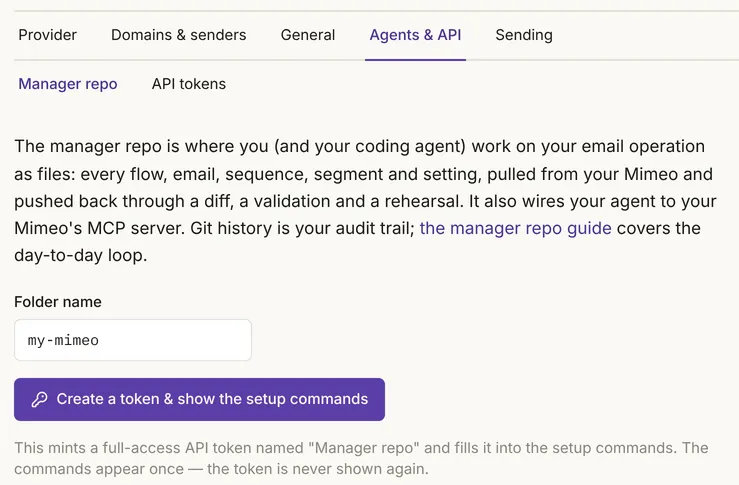
In the test, the first snapshot held 81 definition files from the seed data, plus your Mimeo's address. Git ignores the token's file, so the token never lands in a commit.
2 Make the change on a branch
A branch keeps a change out of your main history until someone has reviewed it.
Start a branch and edit the file. Each email is a Markdown file in the emails folder, with its subject at the top. In the test, the welcome email's subject went from "Welcome — here's how this works" to "Welcome — start with these three things": one changed line in Git's diff.
3 Read Mimeo's diff
Git shows which lines changed; mimeo diff says what the change will do on your Mimeo, and changes nothing.
Run mimeo diff on the branch. In the test it read: subject: "Welcome — here's how this works" → "Welcome — start with these three things". It also flags problems: a segment rule naming a tag nobody has came back with a warning that nothing can match it until that tag exists.
4 Review it in a pull request
Reviewers read both diffs, so a broken change shows up before anyone merges it.
Open a pull request at your Git host and paste the mimeo diff result into its description. When a change would break something, mimeo diff says so. In the test, a flow step pointed at an email that doesn't exist came back "sends email #999, which does not exist", and pushing it printed "Refusing to apply." Forcing the push applied nothing either.
5 Merge, then push
The merge records the decision; the push is the only step that changes your Mimeo.
Merge the pull request, switch to your main branch and run mimeo push. It shows the diff again, checks the change, rehearses any flow it touches and asks before it applies. In the test it asked "Apply 1 change? [y/N]", then printed "Applied 1 change" and "Open admin pages have already updated."
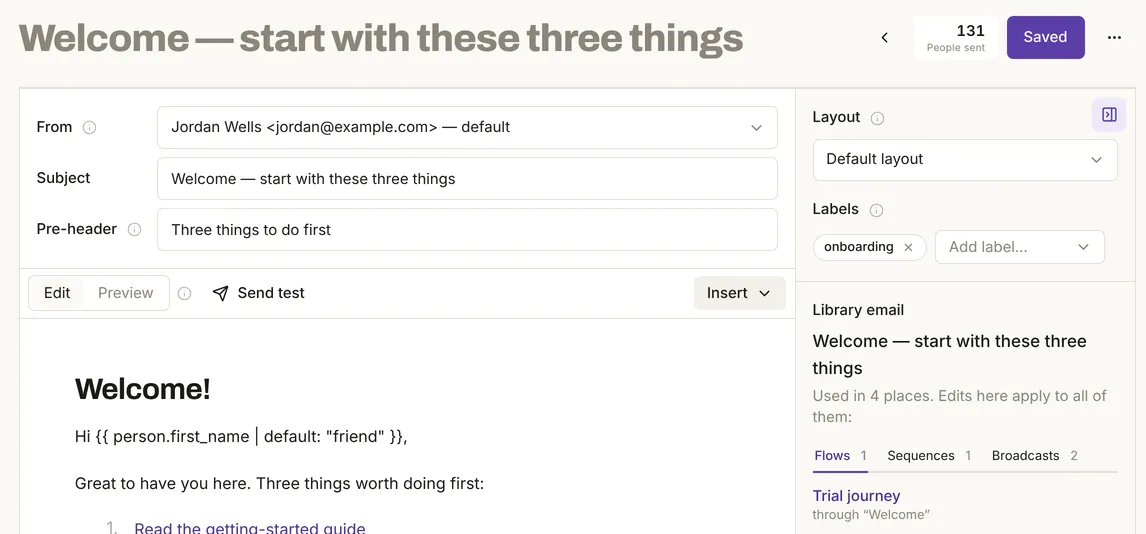
People, sends and flow runs were the same before and after.
6 Pull and commit what Mimeo changed
Your Mimeo can change outside the repo, so pull after each push and before each new branch, and commit what comes down.
Run mimeo pull. A subject change renames the email's file, and edits made in the web UI or by MCP reach Git only this way. In the test, an email's subject was changed outside the repo to "Workshop seats open Friday" while the repo still said Thursday; mimeo diff from the stale repo showed a push would put Thursday back. The pull wrote Friday into the file, and Git showed it as a change to commit.
7 Undo a change
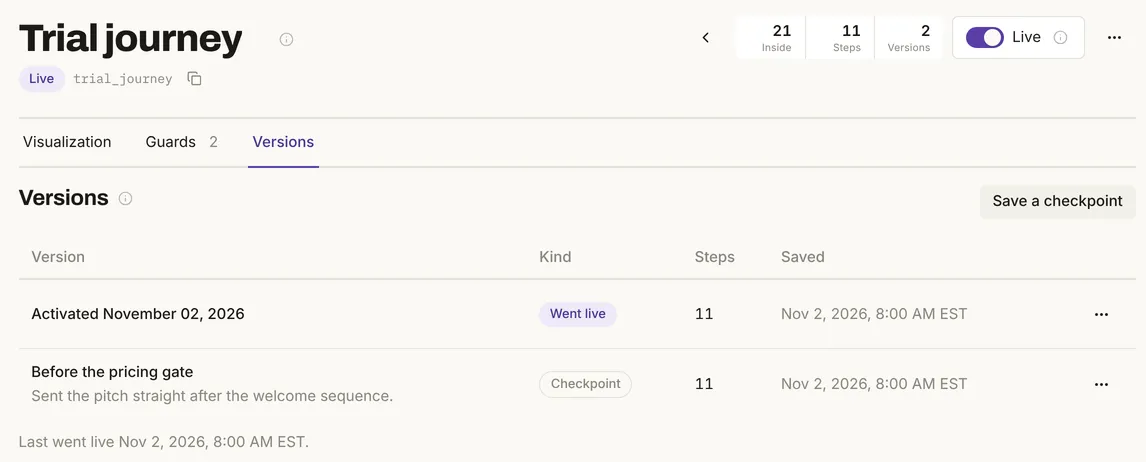
To undo a change, revert it in Git and push the revert.
Revert the merge, read mimeo diff, then push. In the test, the diff showed the subject going back to "Welcome — here's how this works", and the push applied it. Deleting a file is not an undo: the push leaves that flow, email or segment on your Mimeo and says "left alone". For a single flow, its Versions tab can roll back without Git.
Build it with your agent
1 Connect the repo and take a first snapshot
Your first commit is the starting point every later change is compared with.
Set up the repo with Getting yours, then open your agent in it.
Pull from my Mimeo, commit what came down as a first snapshot, and tell me whether the repo and my Mimeo agree. Don't push anything.
What to look for: a commit with your definition files and no token in it, and a diff that finds nothing to push.
2 Make the change on a branch
A branch keeps a change out of your main history until someone has reviewed it.
Start a branch called welcome-subject and change the welcome email's subject to "Welcome — start with these three things". Show me the git diff, but don't push.
What to look for: one changed line, the subject, in the email's file.
3 Read Mimeo's diff
Git shows which lines changed; Mimeo's diff says what the change will do, and changes nothing.
Run mimeo diff on this branch and explain what it would change on my Mimeo, including any warnings.
What to look for: the old and new subject, any warning in plain words, and nothing applied.
4 Review it in a pull request
Reviewers read both diffs, so a broken change shows up before anyone merges it.
Commit this and open a pull request. Put the mimeo diff result in the description. If mimeo diff reports a problem, stop and tell me instead.
What to look for: a pull request whose description shows Mimeo's diff. If the diff fails, your agent should stop and quote the problem.
5 Merge, then push
The merge records the decision; the push is the only step that changes your Mimeo.
The pull request is merged. Switch to main, pull from Git, run mimeo diff, and push only after I say yes.
What to look for: the same diff, a question before the push, then "Applied 1 change".
6 Pull and commit what Mimeo changed
Your Mimeo can change outside the repo, so pull after each push and before each new branch.
Pull from my Mimeo and commit anything that changed there, with a message that says what changed.
What to look for: the email's file renamed to match its new subject, and any edits made in the web UI, in one commit.
7 Undo a change
To undo a change, revert it in Git and push the revert.
Undo the welcome-subject change: revert the merge, show me the mimeo diff, and push after I say yes.
What to look for: the old subject in the diff, a question, then the push.
Limits
The test ran on a local install with seed data and local Git only.
- No Git host or AI agent was used. Branches, review and merges were local Git commands, the steps a pull request runs. No agent ran the prompts, so each one shows what to look for, not a captured reply.
- Git history includes edits made in the web UI or by MCP only after someone pulls and commits them.
- The repo is not a backup. People, sends and reports stay on your Mimeo.
- A check at your Git host needs a token.
mimeo difffails when a push would be refused, so it can run as a check on each pull request. But every token you can create has full access, including sending: store it as a secret and keepmimeo pushout of automated jobs. - Mimeo's own history covers flows only. For emails, segments, guards and settings, your Git history is the history.
When not to use this
Four cases call for something else.
Facts, checked
Every changeable fact on this page, with its source and the date it was last checked.
| Fact | Value | Source | Checked |
|---|---|---|---|
| Release tested | Mimeo 0.3.4, CLI 1.2.0 | Changelog | |
| What the repo holds | Tested: flows, sequences, segments, guards, emails, layouts, themes, fields, products, settings and media, plus your own files | Manager repo | |
| What stays out | Tested: the token's file is ignored by Git. Documented: people, events and sends; provider keys and webhook secrets | Definition files | |
| Git and your Mimeo | Documented: Mimeo never reads your Git repo; a Git host is optional | CLI | |
| Mimeo's diff | Tested: changes nothing, flags warnings, fails when a push would be refused | CLI | |
| A broken change | Tested: refused before anything applies, a forced push included | CLI | |
| Merge, then push | Tested: a merge changes nothing; the push shows the diff, asks, then applies | CLI | |
| Pull after a push | Tested: renames an email's file when its subject changed | Definition files | |
| Edits made outside the repo | Tested: reach Git only when pulled; a push from a stale repo would undo them | Manager repo | |
| Undo | Tested: a Git revert plus a push puts the old version back | CLI | |
| Deleted files | Tested: a push leaves the item on your Mimeo | CLI | |
| Mimeo's own versions | Tested: a Versions tab on each flow. Documented: none for emails, segments, guards or settings | Flows | |
| Manager repo token | Tested: full access, including sending; shown once | Manager repo |
How this was tested
On one local install of Mimeo 0.3.4 with its seed data (200 people on example-seed.com), on November 2, 2026, with the manager repo in a local Git repository. Branches, review and merges were local Git commands; no Git host and no AI agent were used. The change made outside the repo went through the HTTP API, which saves the same record as the web UI. People, sends, flow runs and events were the same before and after.
Next
The docs cover each part in full.
- Pricing: cost, license and what you need to run Mimeo.
- Manager repo: setup and the day-to-day loop.
- CLI and Definition files: every command, and what each file holds.
- How it fits together: the web UI, API, CLI and MCP server on one map.
- Let an AI agent run your email without accidental sends: the checks to set up before your agent pushes anything.