
Mimeo is self-hosted email automation software that sends email when someone signs up or buys in your app or store. Your app or store tells your Mimeo about each signup or order, and a flow listening for it sends the email through your own Postmark or Resend account. Give each signup or order its own key, such as the order number, and a retried one never emails anyone twice.
Flows in Mimeo start on any event, sales included, so a trial signup and a repeat order can each get their own email. You build them in the dashboard or with your agent, on your own server.
Your app tells Mimeo what happened, and a flow sends the email
Each signup or order reaches your Mimeo as an event: a short message saying what happened, and to whom.
- A signup sends
signed_up, with details like the plan they picked. - An order sends
purchase, with the product and amount. - A store that only offers a webhook (its own message about each sale) needs a small handler on your server to pass each order on. Your agent can write it.
The event adds or updates the person and starts any live flow that listens for it. Mimeo has no direct connection to Stripe or a store; your code or handler is the connection.
Before you start
- Your Mimeo, running on your server (run it on your own server), with your own Postmark or Resend account for sending.
- Somewhere that runs on signup and on a paid order: your app's code, or your store's order webhook.
- Two emails in your library: a welcome and an order thank-you.
- For the agent tab: Claude Code or Codex, working in your manager repo (Getting yours sets it up).
Steps
Both tabs build the same two flows: a welcome for trial signups and a thank-you for every order.
Build it in Mimeo
1 Name your events, and keep what emails need on the person
Name events in the past tense, from the person's side, and put variations such as the plan in the details, not the name (designing your event names).
An email can't read the event's details, so keep what it needs on the person. For the product: go to People → Fields, click New field, set the key to last_product and the type to text, and click Create field. Your code sends that field with each order.
2 Build the signup flow: once per person
Go to Automation → Flows and click New flow. Name it "Trial welcome", pick Single run ever, and click Create draft.
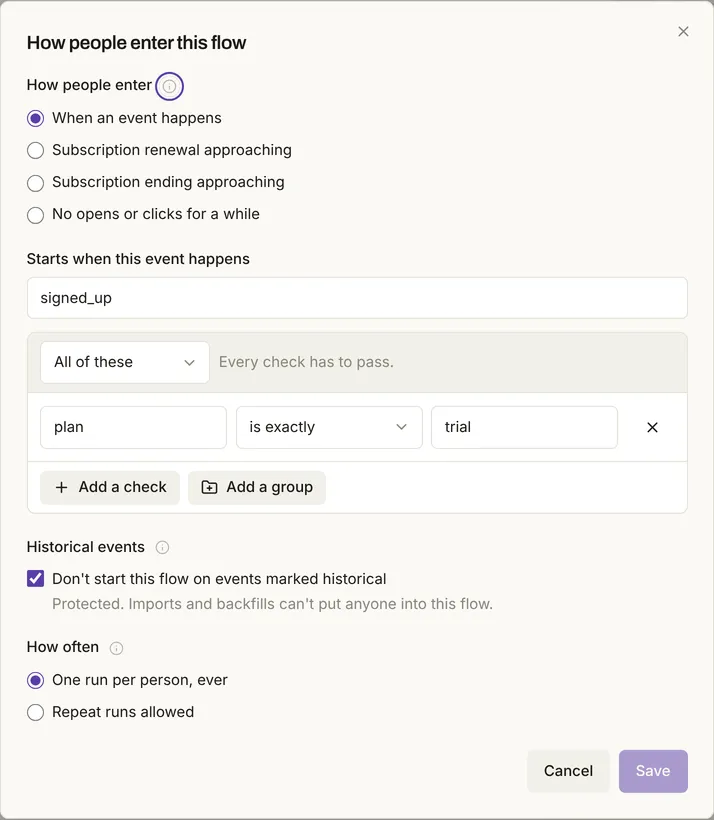
On the Flow begins box, click Entry rules. Set Starts when this event happens to signed_up, click Only when a detail matches, set plan is exactly trial, and click Save. Then use Add a step here to add an Add tag step for trial and a Send email step with your welcome.
3 Build the order flow: every order
Click New flow again. Name it "Order thank-you", pick Repeat runs allowed, and click Create draft. In Entry rules, set Starts when this event happens to purchase and save. Add an Add tag step for customer and a Send email step with the thank-you.
In the thank-you, insert the last_product field with a fallback such as "from us", so an order without it still reads well (email variables).
4 Rehearse both, then make them live
A rehearsal shows what a flow would do for a real person, and changes nothing.
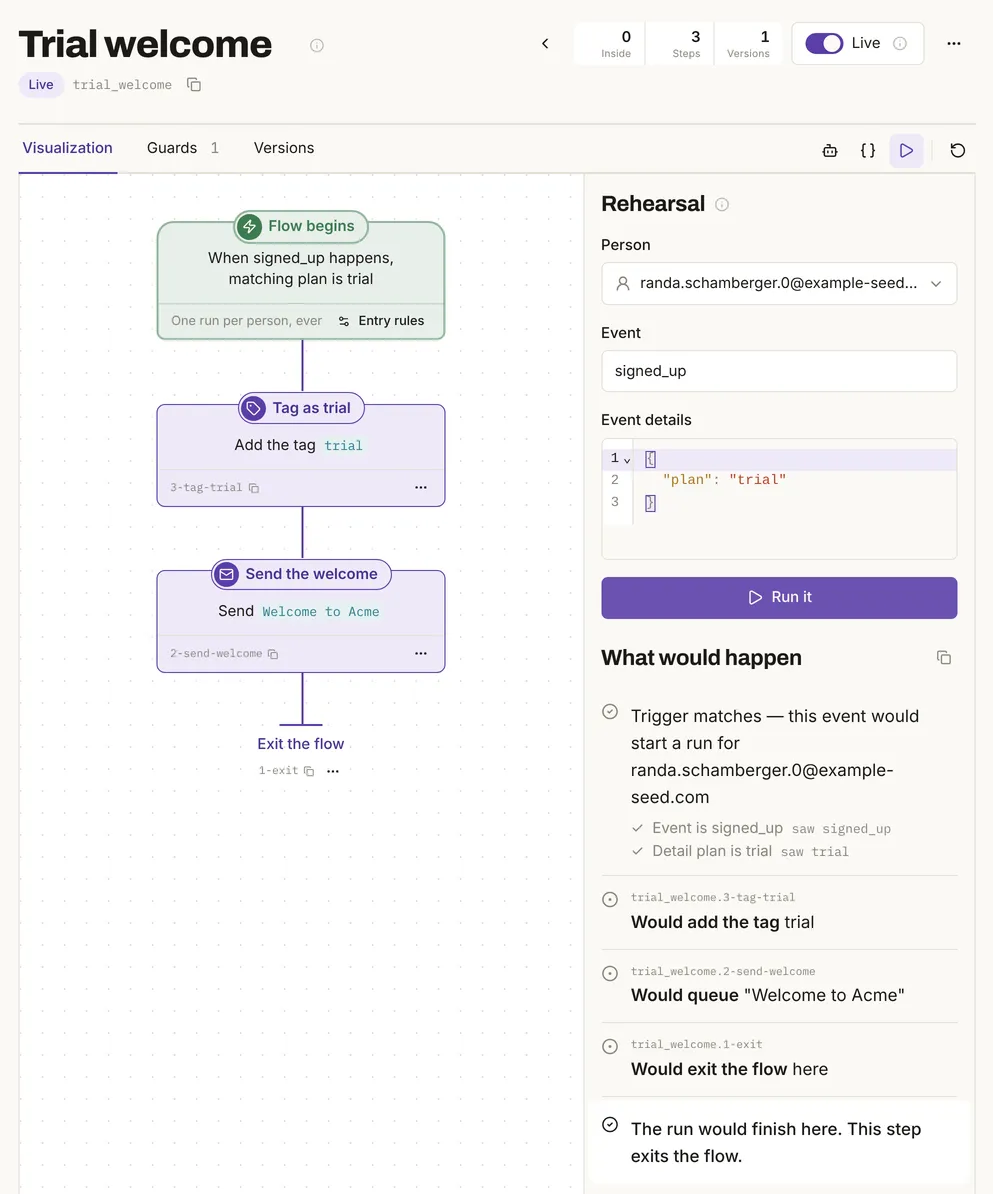
On the signup flow, click Rehearse it, pick someone on your list, keep the plan set to trial in the event details, and click Run it. In the test it said "Trigger matches", "Would add the tag trial" and "Would queue "Welcome to Acme"". With the plan set to free, it said the trigger doesn't match and nothing would happen. Rehearse the order flow the same way.
Then click Make it live on each and confirm.
More on rehearsals: test a flow before it sends.
5 Send a test signup and a test order
Your server needs a token. Click your email address at the bottom of the sidebar, choose Settings, then Agents & API → API tokens, name it and click Create token. It's shown once and has full access, so keep it in your server's settings, never in a page.
Then ask your agent to have your code send a test trial signup and a test order for the same address, each with its own key: the account ID for the signup, the order number for the order. The event contract gives your agent the exact shape.
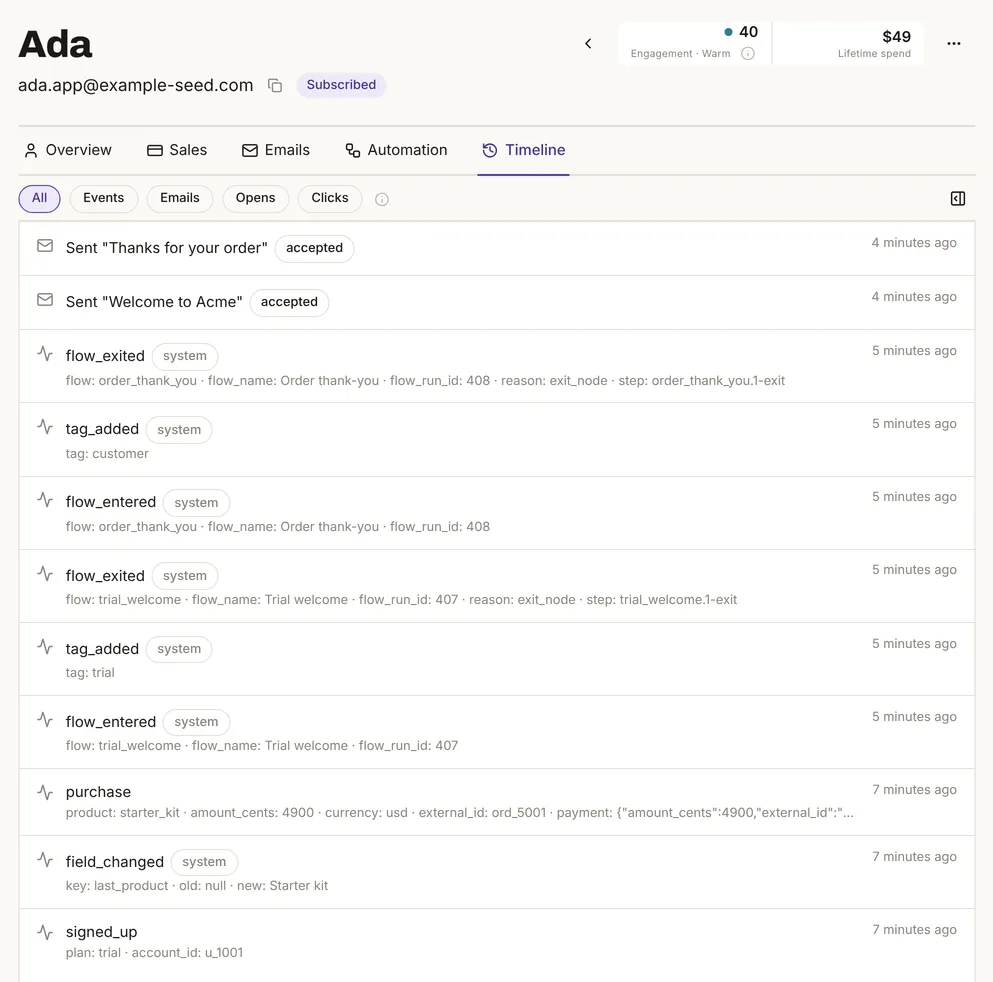
In the test, the person got both tags and both emails within a minute, and their page showed the order. Sending each again with the same key changed nothing.
6 Check what listens before you rename an event
Renaming an event in your code quietly stops every flow that listens for the old name.
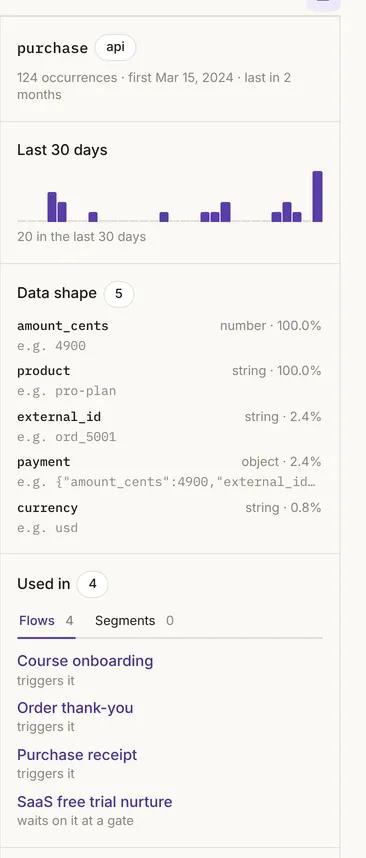
Go to Events → Events and click purchase. Data shape shows what your orders send, and Used in lists every flow that starts on it or waits for it, live or not. Check it before a rename, or when an email didn't go out.
Build it with your agent
Your agent builds and checks the flows through your manager repo or the MCP server, and can write the code in your app that sends the events. The event contract tells it the shape.
1 Build both flows
Build a single-run flow that sends Welcome to Acme when signed_up arrives with plan trial, and a repeat-run flow that sends Thanks for your order on every purchase. Rehearse both and show me, but don't make them live.
What to look for: two draft flows, and a rehearsal that matches a trial signup and skips a free one.
2 Create the token yourself
Create it in Settings → Agents & API → API tokens, as in the other tab. Keep it out of the chat and out of your repo.
3 Have your agent write the code that sends events
Write the code in our app that sends signed_up and purchase events to our Mimeo, with the account ID and the order number as idempotency keys and last_product as a person field. Read the token from an environment variable.
What to look for: code in your app, not your manager repo, with one key per signup or order, never per customer.
4 Load past orders safely
Before we load last year's orders, check that every event in the backfill is marked historical and has its own key.
5 Go live, then check what listens
Make both flows live. Then tell me which flows and segments listen for purchase.
A retry never emails anyone twice, as long as each event has its own key
Mimeo ignores an event whose key it has already seen, so a retried webhook can't send a second email.
- Sent twice with the same key: one event, one flow run, one email.
- Resent without a key: a new event. The order's own ID kept one purchase on record, but the thank-you went out twice.
- A key reused for a different event: the new event is quietly dropped. Use the order number or account ID, never the customer's ID.
Past signups and orders come in without emailing anyone
Events marked historical are recorded and start nothing.
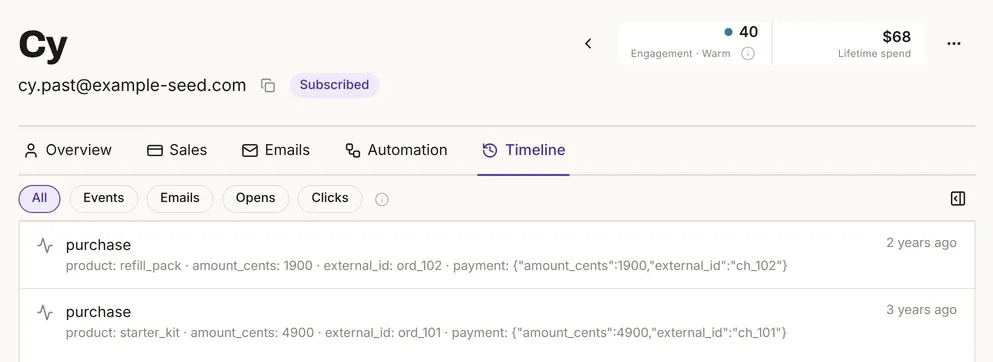
Ask your agent to send old events marked historical, each with its date and its own key. In the test, two old orders and a signup landed on the timeline with their real dates, and no flow started, even with both flows live.
Your agent can send up to 100 at a time; one bad event fails only itself (batching, backfilling). Moving a whole list from another platform is a different job: migrate from Mailchimp or Kit.
A buyer who unsubscribed gets no follow-up
Mimeo records their order and drops the thank-you at send time (never email people who unsubscribed).
Every email Mimeo sends is marketing mail. Receipts, order confirmations and password resets stay with your store or app (transactional vs marketing email). For ideas on what to send after a sale, see post-purchase emails.
When something else fits better
Limits
- Something you run turns each signup or order into an event. Mimeo doesn't connect to a store or Stripe for you.
- Trials, renewals and subscriptions are separate money events, covered in the event contract.
- Tested on one local install with demo data and the test provider, so nothing was delivered. No real store, Stripe webhook or live handler was used, and the agent prompts weren't run with an agent.
Facts, checked
| Fact | Value | Source | Checked |
|---|---|---|---|
| Release tested | Mimeo 0.3.7 | Changelog | |
| Events | Tested: add or update the person and start matching live flows; an order adds to lifetime spend | Event contract, lifetime spend | |
| Flows | Tested: matching on plan; one welcome per person, a thank-you per order; rehearsals change nothing |
Triggers, runs, rehearsal | |
| Keys | Tested: a repeated key changes nothing; a reused key keeps the first event; an order resent without a key sent a second thank-you | Fields, purchase |
|
| Past events | Tested: historical events started nothing; batches of up to 100, one bad event fails only itself | Backfilling, batching | |
| Emails | Tested: can't read event details; can read person fields. A buyer who unsubscribed gets no follow-up | Emails, guards | |
| Events and tokens | Seen in the app: Used in, on Events → Events. Tested: tokens are shown once, with full access | Activity & events, API |
Next
- Pricing: cost, license and what you need to run it.
- Event contract: what your code sends, money events included.
- Flows and Activity & events: triggers, runs and what listens.
- The event contract. Checked .
- Event reference. Checked .
- Activity & events. Checked .
- Flows. Checked .
- Emails. Checked .