
To make sure people who unsubscribed, bounced or complained never get emailed, keep one suppression list that every send checks. In Mimeo that list lives in your own database: unsubscribes, hard bounces, spam complaints and imported opt-outs all land on it, and a built-in guard that can't be turned off stops every email to them, test sends included. The list stays put when you change sending provider, and your agent works under the same check as you.
Five things put someone on the list
A suppression list is the list of addresses you must not email. In Mimeo, a person on it is unsubscribed, and their page says why.
| What happened | Reason on their page | Copied to Postmark too? |
|---|---|---|
| They clicked their inbox's unsubscribe button, or the link in your email | one_click or unsubscribe via link |
Yes |
| Your provider reported a hard bounce | hard_bounce |
No, it came from there |
| Your provider reported a spam complaint | complaint |
No, it came from there |
| You or your agent unsubscribed them | unsubscribe via manual |
Yes |
| You imported them as already unsubscribed | imported |
No |
A flow's prune step and erasing someone also suppress them. A soft bounce, such as a full mailbox, suppresses no one.
Before you start
- Your Mimeo, on your own server. Run Mimeo on your own server covers it.
- Postmark or Resend connected, with its webhook added, so your provider tells your Mimeo about each bounce and complaint. The Postmark guide and the Resend guide cover it.
- Your old tool's opt-out export, if you are moving.
- For the agent tab: Claude Code or Codex, working in your manager repo (Getting yours).
Steps
Build it in Mimeo
1 Make sure bounces and complaints come back
Without the webhook, your Mimeo never hears that an address bounced or complained.
Add it in your provider as the Postmark guide or the Resend guide shows. In the test, a hard bounce and a spam complaint each unsubscribed the person the moment the provider reported it. A soft bounce didn't, and a fake report was refused.
2 Bring old opt-outs in before anyone else
An opt-out left behind in your old tool becomes a mailable person here.
Open People → Import CSV with your old tool's opt-out export and turn on Import everyone as already unsubscribed. Do this before you import your active list. Move from Mailchimp or Kit gives the full order.
3 Find the built-in guard
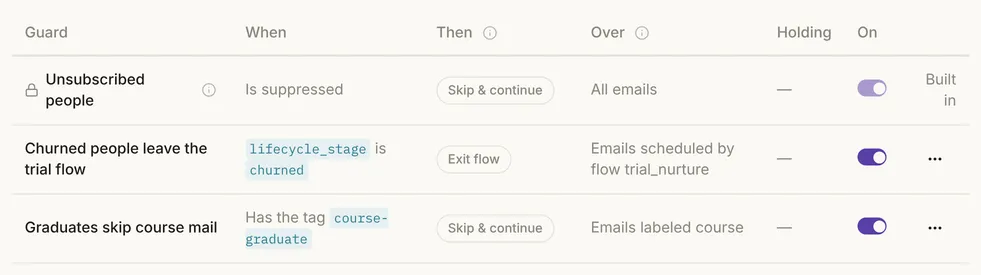
Open Automation → Guards. Unsubscribed people sits at the top, marked Built in, with its switch locked on. It "can't be edited, disabled or deleted" and "applies even to test sends."
4 Send a test to a suppressed person
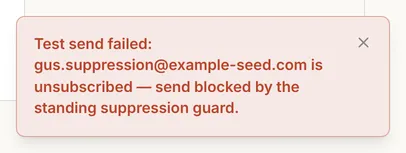
Open any email, click Send test and pick a suppressed person. It is refused before anything reaches your provider. In the test, every suppressed person was refused, however they got on the list.
5 Check who is suppressed, and why
Open People and set the status filter to Unsubscribed. Each person's page shows the reason and where it came from, so an opt-out from your old tool and last week's complaint stay distinct.

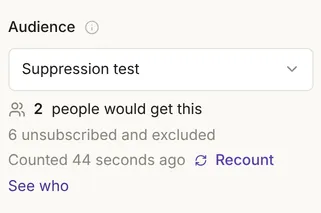
A broadcast only counts people who can receive it. Someone who unsubscribed after their broadcast email was queued was still caught as it sent.
6 Erase with the suppression stub kept
A data-deletion request shouldn't make the address mailable again.
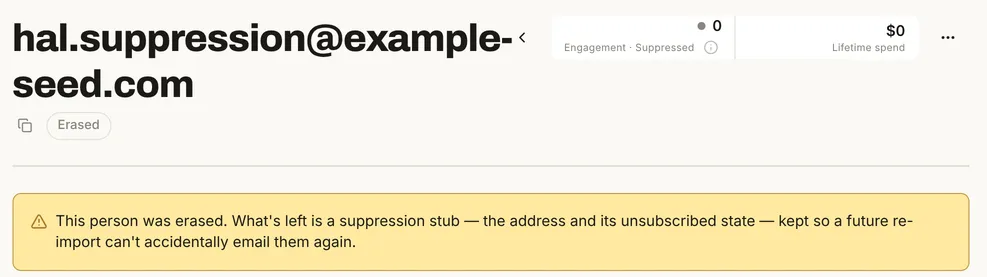
On the person page, open the menu and choose Erase…. Leave Keep a minimal suppression stub so a future re-import can't email them again ticked. In the test, re-importing the erased address left it unsubscribed.
Build it with your agent
1 See who is on the list
List everyone who is unsubscribed, with the reason and where it came from. Group them by reason.
What to look for: reasons such as hard_bounce, complaint, one_click and imported. Your agent reads them through the MCP server and the People API.
2 Import old opt-outs first
Import mailchimp-unsubscribed.csv with everyone as already unsubscribed, then show me the import report.
What to look for: every row unsubscribed with reason imported, and nobody resubscribed. The imports API has the same switch.
3 Check a broadcast's audience
Before the November newsletter goes out, how many people in its segment will get it, and how many are left out because they're unsubscribed?
What to look for: two numbers that add up to the segment, as in Fig. 5 of the other tab.
4 Unsubscribe someone who wrote in
pat@example.com wrote in asking to stop all email. Unsubscribe them, then confirm a test send to them is refused.
What to look for: unsubscribed as manual, and the test refused. Your agent can't turn the built-in guard off either. Erasing someone is done on their page, as in the other tab.
Nothing puts them back by accident
Only a deliberate resubscribe takes someone off the list.
In the test, a new signup, a re-import and re-importing an erased address all left people unsubscribed. A resubscribe comes from the person, on their unsubscribe page, or from you or your agent with Resubscribe on their page. It works at once, so treat it as a decision.
With Postmark, a resubscribe also lifts Postmark's own block, except for spam complaints. Don't resubscribe people who complained.
The list stays when you change sending provider
The list lives in your Mimeo, not at your provider. In the test, the provider went from Postmark to Resend to the test provider, and all 31 people stayed suppressed.
| Postmark | Resend | |
|---|---|---|
| Your unsubscribes copied to the provider | Yes | No |
| Nightly check of the provider's own list | Yes, for people emailed in the last 30 days | No |
| Bounces and complaints reported back | Yes | Yes |
One thing doesn't come across by itself: an address blocked only at your old provider, such as one added in its dashboard. Export that list and import it as already unsubscribed before you switch.
Limits
- No real Postmark or Resend account was used. Bounce and complaint reports were sent by hand in Postmark's format, with Postmark's test token. The agent prompts weren't run.
- Your Mimeo only learns what your provider reports. Resend notes that Gmail doesn't report spam complaints.
- The unsubscribe link in your email is yours to keep. Mimeo adds the inbox's unsubscribe button to every email but doesn't check your template has the link. Yahoo and Google expect both.
When not to use this
Facts, checked
Tested on one local install on November 16, 2026, with demo data (200 people on example-seed.com plus 8 test people) and Postmark's test token, so nothing was delivered.
| Fact | Value | Source | Checked |
|---|---|---|---|
| Release tested | Mimeo 0.3.7 | Changelog | |
| Ways onto the list | Tested: one-click unsubscribe, hard bounce, spam complaint, operator, import as already unsubscribed, erase with the stub. Also the footer link, the subscription API and a flow's prune step | People | |
| Soft bounce | Tested: recorded on the email; the person stays subscribed | Hard vs soft bounce | |
| Test sends | Tested: refused, "send blocked by the standing suppression guard" | Guards | |
| Broadcasts | Tested: the audience counts subscribed people only; an email queued for someone who unsubscribes later is dropped at send time | Broadcasts | |
| The built-in guard | Tested: can't be changed or deleted, including by your agent; always on | Guards | |
| What resubscribes someone | Tested: only an explicit resubscribe; a signup event, a re-import and re-importing an erased address don't | People | |
| Changing provider | Tested: Postmark to Resend to the test provider, 31 of 31 still suppressed | Postmark setup | |
| Postmark sync | Unsubscribes made in your Mimeo are copied to Postmark; a nightly 3am check for people emailed in the last 30 days. Tried, refused by the test token | Postmark setup | |
| Resend sync | None: no copy and no nightly check; bounces and complaints by webhook | Resend setup | |
| Not run here | Flow and sequence emails, the unsubscribe page, and agent calls; they go through the same send-time check | Guards | |
| Postmark's own suppressions | Documented: hard bounces and spam complaints are deactivated per message stream; a spam complaint can't be lifted | Postmark suppressions | |
| Resend's own suppressions | Documented: one list for your team; Gmail doesn't report complaints | Resend suppressions | |
| Yahoo and Google | Documented: one-click unsubscribe and a visible unsubscribe link in the body; Yahoo asks for unsubscribes to be honored within 2 days | Yahoo, Google |
Next
- People: unsubscribing, resubscribing and erase.
- CSV import and Guards.
- Webhooks and List-Unsubscribe.
- Move from Mailchimp or Kit: bring your opt-outs over first.
- Pricing: the flat software price, the license and requirements.
- What are bounces and spam complaints?. Checked .
- Suppressions API. Checked .
- Email suppressions. Checked .
- Sender best practices. Checked .
- Email sender guidelines. Checked .