
Mimeo and Mailcoach are both email software you buy once and run on your own server. Choose Mimeo for flows on any event, sales included, run by your agent or an easy web UI, with less to keep running. Choose Mailcoach for a lower price ($249 vs $499), email inside a Laravel app, or a hosted plan.
Mimeo leads on flows and upkeep, Mailcoach on price and hosting
Mimeo leads on what can start and steer a flow, on running it from your agent or the dashboard, and on how little it takes to run. Mailcoach leads on price, Laravel integration and a hosted plan.
| Detail | Mimeo | Mailcoach |
|---|---|---|
| Automations | Flows on any event, sales included, with branches, waits and gates; sequences; dry run against a real personTested · · Flows, Sequences | Automations with triggers, waits and tag or open/click conditionsAutomations, Learn: Automations · |
| Store events | A checkout or purchase event your store sends starts a flow; a gate waits for the purchase; flows and sequences can repeat per person | A webhook trigger can start an automation; waiting for a later event, such as a purchase, not stated in its docsAutomations · |
| Check before it sends | Validate, then a dry run for a real subscriber; test sendTested · · Flows, Emails | Preview, a delivery checklist and a test email for each automation email; a dry run for a real subscriber not stated in its docsLearn: Automations, Automations · |
| Checks as it sends | Guards check every email at the moment it sendsTested · · Guards | An account-wide suppression list; audience exclusions per campaign; a standing rule checked as every email sends not stated in its docsLearn: Suppressions, Changelog, Automations · |
| Agent access | HTTP API, MCP server and CLI, on your own instance | REST API; Mailcoach CLI with an AI skill; MCP server, hosted or self-hosted (10.4+): its docs list drafts, templates and test sends, and its changelog adds sending campaignsAPI authentication, CLI, MCP server, Changelog · |
| Runs on | A Rails app with one SQLite database, on your server | PHP 8.3+, Laravel 11.28+, Livewire, Filament, Redis, MySQL 8.0+ and Laravel Horizon; a scheduler every minuteRequirements · |
| Sends through | Your own Postmark or Resend account | Postmark, Resend, SES, Mailgun, Sendgrid, Brevo, or SMTPMailcoach Self-Hosted, Configuring mail providers · |
| Signup forms | Your site, store or agent sends a signup eventTested · · Getting started | An HTML form on your site posts to a list; double opt-in recommended for form listsLearn: Email lists · |
| Price | $499 once | $249 once (1 domain) or $999 (unlimited domains), 1 year of updates; hosted €9.99/mo with 2,000 emails includedMailcoach, Pricing · |
| What the price includes | A year of support & updates, then $199/yr, optional; Mimeo keeps working if you cancel | 1 year of updates and the private repository; renewable (price not published); keeps working if you don't renewMailcoach, Getting a license · |
| What one license covers | One installation: one Mimeo on one domain, with one list | Single domain: one domain or subdomain, one production install, not built into a SaaS. Unlimited domains: may be built into a SaaSMailcoach, Mailcoach Self-Hosted · |
| Refund | 14-day money-back guarantee | 10-day money-back guaranteeMailcoach · |
| Source license | Commercial license, bought once; not open source | Commercial license per domain; not open source, source in a private repository for licenseesMailcoach Self-Hosted, Getting a license · |
Mimeo is the better pick when flows carry your email
Both run on your server and send through your own provider, so owning your list is a tie. Mimeo's lead is in what its flows can do, who can run them and how little sits beside it.
Flows start, and wait, on any event, sales included. A signup, a checkout or a purchase can start a Mimeo flow, which branches on fields, tags, purchases, subscriptions and segments. After a checkout, a gate waits for the purchase and follows up when it doesn't come, and a flow set to Repeat runs allowed (runs) starts again on the next order.
Mailcoach has a webhook trigger too, so your app can start an automation. Its docs list three built-in conditions (has a tag, opened or clicked an automation mail) and a wait "for a set interval"; anything else is code a developer writes for a self-hosted install. Waiting for a later event, such as a purchase, isn't stated in its docs (checked ).
Your agent and your team work on the same flows. Your team works in the dashboard while your agent edits the same flows, and each change is checked and rehearsed before it applies. Mailcoach has an API, a CLI "auto-generated from the Mailcoach OpenAPI spec" that ships with an AI skill, and MCP servers, hosted and self-hosted (10.4+). Its MCP docs describe drafts, templates and test sends and say it "does not expose a tool that sends a campaign to your full audience"; its changelog of September 17, 2026 says "MCP clients can now send campaigns immediately". Its CLI and MCP pages don't describe rehearsing a change for a real subscriber. In both, a fully permitted token can send.
Less to run. Mimeo is one app on one server, with one SQLite database and its jobs running inside the app. Mailcoach's v10 requirements list PHP and Laravel with several add-ons, plus Redis, MySQL and Laravel Horizon, with a scheduler running every minute: a database server and a queue to keep healthy beside the app.
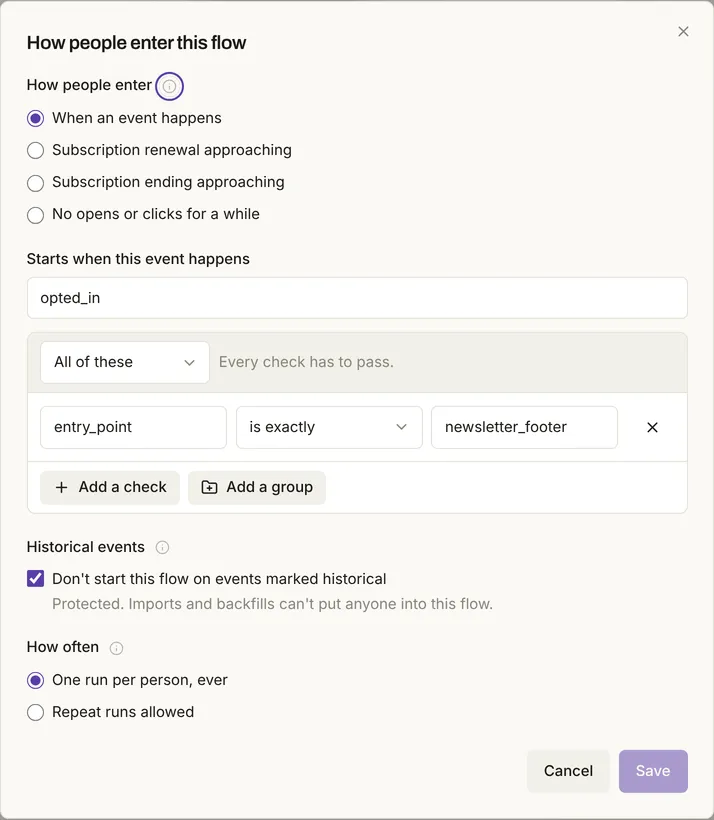
You see what a flow will do before it sends. A dry run walks a flow for one real subscriber and shows each step they'd take, sending nothing. In the test, it said a footer-form signup would be tagged newsletter and started on the 3-email Newsletter welcome. Mailcoach's docs give each automation email a Preview, a Delivery checklist and a test email; a dry run for a real subscriber isn't stated.
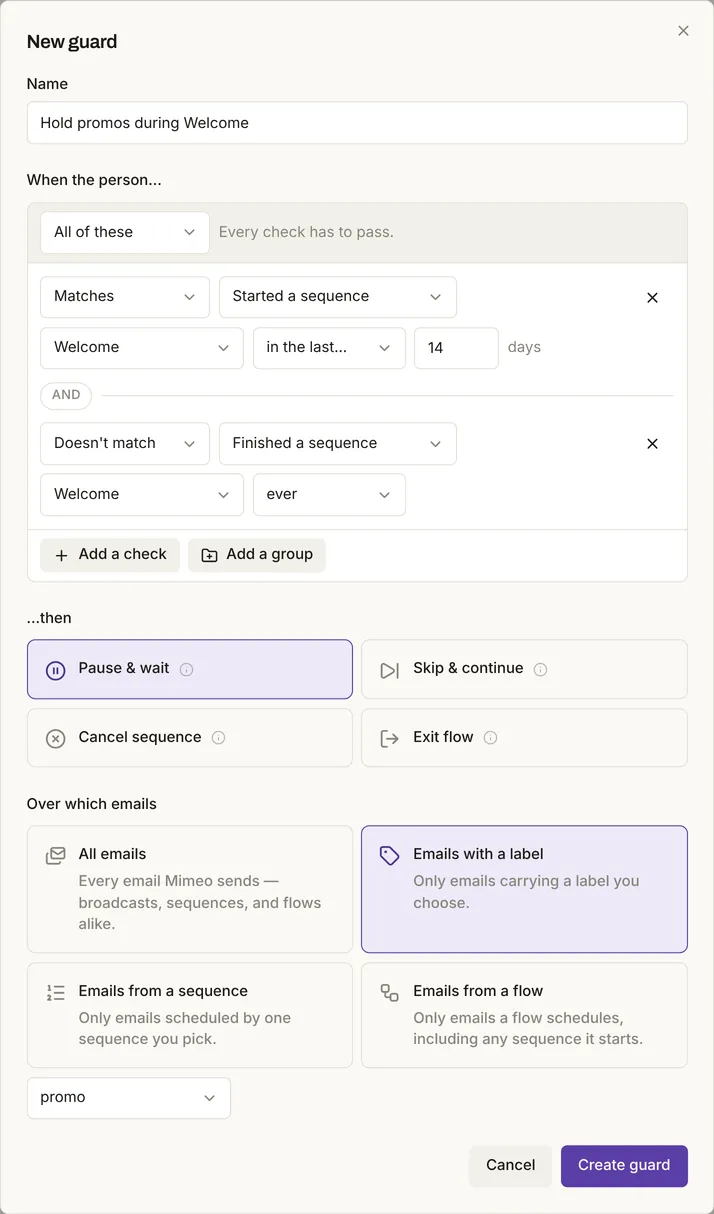
One guard covers every email. Once a flow is live, guards check each email as it sends: one rule can hold promotions for anyone still in a welcome sequence. Mailcoach has an account-wide suppression list and audience exclusions per campaign; a standing rule checked as every email sends isn't stated in its docs.
One welcome sequence: tested in Mimeo, documented in Mailcoach
In Mimeo, one signup scheduled a three-email welcome for the new reader only. Mailcoach's docs describe the same welcome as an automation started when someone subscribes and confirms.
In Mimeo (tested on 0.3.7). Three emails on days 0, 2 and 5, started by the flow in Fig. 1 when someone opts in on the footer form.
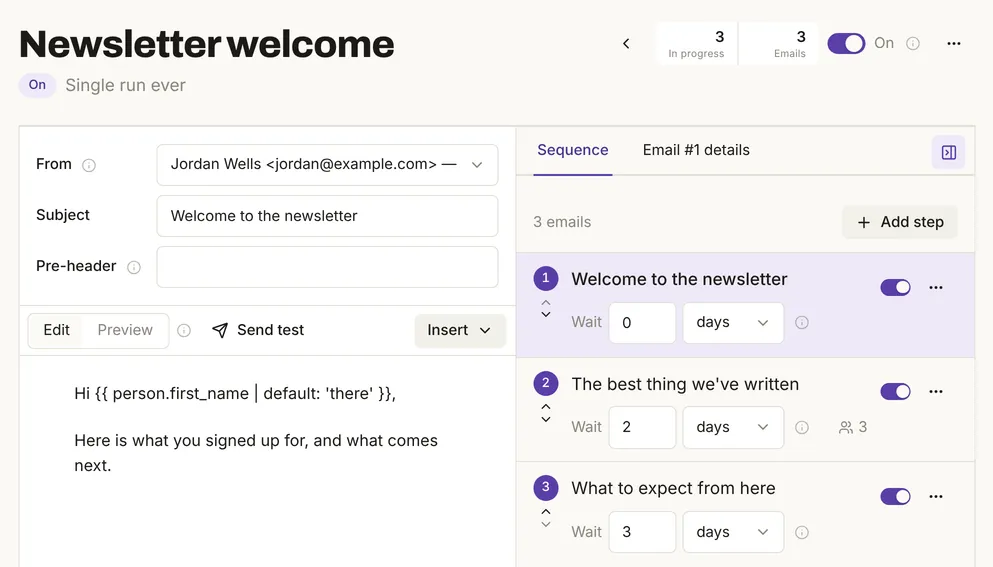
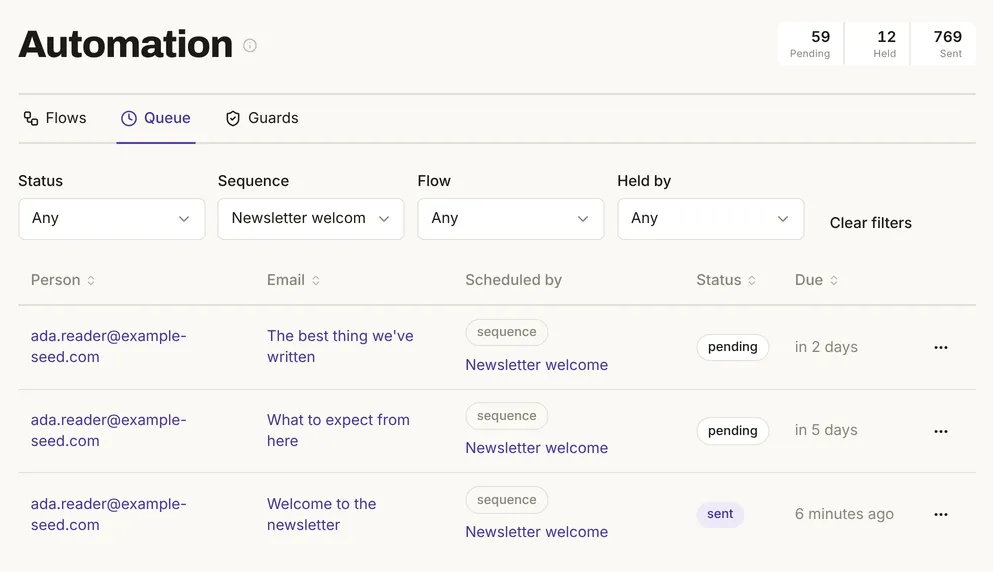
One signup created the reader and scheduled all three emails at once. Of 201 people, only that reader entered the welcome flow.
The same address signing up again started no second welcome. A reader who had unsubscribed stayed unsubscribed: the guard dropped their email at send time.
In Mailcoach (as documented). Create an automation with the "When a user subscribes" trigger and your list, then add Send automation mail and Wait actions, and end with Halt: "If you don't halt the automation for a subscriber that is at the end, it will keep doing those steps for that subscriber indefinitely." The trigger fires once someone is "subscribed and confirmed". Preview each mail and send yourself a test.
Mailcoach is the better pick for Laravel shops and a lower price
Mailcoach costs less, fits inside a Laravel app, and offers a hosted plan if you don't want a server.
A lower price, and a license for many domains. Mailcoach Self-Hosted is $249 once for one domain, or $999 for unlimited domains, which may be built into a SaaS product. Each includes a year of updates; the renewal price isn't published, and Mailcoach keeps working if you don't renew. Mimeo is $499 for one installation, with a year of support & updates, then $199 a year if you keep them.
It lives inside Laravel. Mailcoach installs in an existing Laravel application, and your developers can add their own triggers, actions and conditions.
A hosted plan and newsletter tools. Hosted Mailcoach is €9.99 a month with 2,000 emails included, then paid per email sent, with unlimited contacts. Its pricing page lists split testing and a newsletter archive, and its docs show a signup form you embed on your site, with double opt-in. In Mimeo, your site, store or agent sends each signup as an event.
Which one fits you: flows, or Laravel and hosting
Choose Mimeo if
- Flows carry your email: welcome, onboarding, purchases, renewals.
- A checkout should start a flow that waits for the purchase.
- Your agent and your team should work on the same flows.
- You'd rather run one app and one SQLite database than PHP, Redis and MySQL.
- You want to dry-run a flow for a real subscriber before it goes live.
Choose Mailcoach if
- You already run Laravel and want email inside your app.
- You want the lower price, or one license for unlimited domains or a SaaS.
- You'd rather pay per email on a hosted plan than run a server.
- You want split testing, a newsletter archive and a ready-made signup form.
Stay with Mailcoach if your automations are a few subscribe, tag and wait steps and it already sends what you need. Email that must live inside your Laravel app, or a team that wants a hosted plan, is a reason not to switch.
Moving from Mailcoach: export, import, rebuild automations as flows
The work is getting your subscribers out, an import that keeps unsubscribes, and rebuilding automations as flows.
1 Get your subscribers out
Mailcoach's API lists each list's subscribers as subscribed or unsubscribed, with names, tags and dates. Ask your agent to save each group to its own CSV file. Mailcoach's own export is documented for moving to hosted Mailcoach, and its docs don't give the file's format.
2 Import the unsubscribed file first
Import it with Import everyone as already unsubscribed on, so people who left get no mail from Mimeo.
3 Import everyone else
Map email, first name, last name and tags, and map the subscribe date to Subscribed on to keep join dates. An import never resubscribes anyone and starts no automation by default.
4 Rebuild your automations
Each automation's emails and waits become a sequence, started by a flow; tag, open and click checks become flow conditions. Or have your agent write them.
5 Connect sending
Connect your Postmark or Resend account, the same one if Mailcoach used it.
6 Rehearse and test
Dry-run each flow for a real subscriber, then send yourself a test of each email.
7 Cut over
Ask your agent to connect your signup forms to Mimeo, then pause Mailcoach's automations.
What it costs: the $499 license, then $199 a year for support & updates if you want them. Or we do the move with Setup & Launch: $999, or $1,399 with the license. The migration guide shows the import screens.
Limits
Mailcoach was not installed or used, and the switching steps weren't run with a real Mailcoach export. Mimeo's test used a provider that delivers nothing, so delivery was not tested for either.
Questions
Can Mailcoach start an automation from a purchase?
A webhook can start one, but waiting for a later event, like a purchase after a checkout, isn't stated in its docs (checked November 17, 2026). In Mimeo, a checkout event can start a flow whose gate waits for the purchase and follows up when it doesn't come.
Can an AI agent run each one?
Yes: both have an API, a CLI and MCP, and in both a fully permitted token can send. Mailcoach's MCP docs describe drafts, templates and test sends, and its changelog adds sending campaigns. In Mimeo, your agent works on the same flows as your team and rehearses a change for a real subscriber before applying it.
Is Mailcoach cheaper than Mimeo?
Yes, up front at list prices: $249 once for one domain, against Mimeo's $499. Mailcoach doesn't publish its renewal price; Mimeo's is $199 a year, optional. Both keep working if you don't renew.
Does Mimeo have a hosted plan like Mailcoach?
No. Mimeo runs on your own server only, so your list never sits on our servers. If you'd rather not set it up yourself, our Setup & Launch project does it for you.
- Welcome-sequence test of Mimeo 0.3.7 on a local install, run by Mimeo (output and screens on this page). Run .
- Mailcoach. Checked .
- Mailcoach Self-Hosted. Checked .
- Pricing. Checked .
- Getting a license. Checked .
- Requirements. Checked .
- Automations. Checked .
- Learn: Automations. Checked .
- Learn: Email lists. Checked .
- Learn: Suppressions. Checked .
- Configuring mail providers. Checked .
- API authentication. Checked .
- CLI. Checked .
- MCP server. Checked .
- MCP server (self-hosted). Checked .
- Changelog. Checked .
- Subscribers API. Checked .
- Moving from Mailcoach Self-Hosted to Mailcoach. Checked .
- Terms of sale and license. Checked .
- Deploy Mimeo. Checked .
- Sending providers. Checked .
- Flows. Checked .
- Sequences. Checked .
- Guards. Checked .
- Getting started. Checked .
- CSV import. Checked .
- API. Checked .
- CLI. Checked .
- MCP. Checked .
We make Mimeo. We check every claim against the competitor's own pages and update this page when they change.