
Pick Mimeo if your email runs on flows, and Broadcast if it's mostly newsletters. Both are self-hosted and bought once. Mimeo is powerful email automation you fully control: a flow starts on any event, such as a signup, a checkout or a purchase, and your agent or your team runs it from an easy web UI, on your own server, sending through your own Postmark or Resend account. Broadcast's own Shopify pages say it receives no cart or checkout events and sends a subscriber through a given sequence once. It suits newsletters, at a lower list price ($250 vs $499).
At a glance
Mimeo leads on what can start a flow, store events included, and on running it from your agent or the dashboard; Broadcast leads on price, sending providers and servers per license.
| Detail | Mimeo | Broadcast |
|---|---|---|
| Automations | Flows on any event, sales included, with branches, waits and gates; sequences; dry run against a real personTested · · Flows, Sequences | Sequences with delays, open and click conditions and tags; started by a tag, segment, form, API or by handEmail sequences · |
| Store events | A checkout or purchase event your store sends starts a flow; a gate waits for the purchase; flows and sequences can repeat per person | Receives no cart or checkout events; a subscriber goes through a given sequence once; native Shopify events plannedConnecting Shopify to Broadcast, What should a Shopify store email after the order? · |
| Check before it sends | Validate, then a dry run for a real subscriber; test sendTested · · Flows, Emails | Step preview filled with mock data; no dry run for a real subscriber in its docsEmail sequences · |
| Checks as it sends | Guards check every email at the moment it sendsTested · · Guards | Segment exclusions set per broadcast and per sequence; no rule for being in a sequence in its docs; since 3.0, a plugin's Before Send hook for broadcasts only, not sequence emails, skipped on test sends; if it fails or takes over 5 seconds, the email goes out unchangedBroadcast emails, Segments, Before Send hook · |
| Agent access | HTTP API, MCP server at /mcp, CLI (bin/mimeo) | REST API, MCP server at /api/mcp, broadcast CLIAPI authentication, MCP server, CLI · |
| Runs on | A Rails app with one SQLite database, on your server | A Docker image with PostgreSQL 17 on a fresh Ubuntu 24.04 or 26.04 serverSystem requirements · |
| Sends through | Your own Postmark or Resend account | Amazon SES, Postmark, Mailgun or SendGrid (guided setup); Resend, SMTP.com, Inboxroad or any SMTP serverESP integrations · |
| Signup forms | Your site, store or agent sends a signup eventTested · · Getting started | Embeddable opt-in forms with double opt-inOpt-in forms · |
| Price | $499 once | Regular $250, Agency $450, Extended $1,000, once; no renewalPricing · |
| What the price includes | A year of support & updates, then $199/yr, optional; Mimeo keeps working if you cancel | All 2.x updates; future major versions not promised; your installed copy keeps working. 3.0 shipped November 9, 2026; Broadcast hasn't stated the 3.x termsPricing, License · |
| What one license covers | One installation: one Mimeo on one domain, with one list | 1, 5 or 25 servers by tier; client installs on Agency and ExtendedPricing, License · |
| Refund | 14-day money-back guarantee | 30-day money-back guaranteePricing · |
| Source license | Commercial license, bought once; not open source | Commercial license; not described as open sourceLicense, Pricing · |
Where Mimeo is the better pick
Mimeo fits you when flows carry your email. Any event can start one, a store's checkouts and purchases included, and your agent or your team runs it on your own server. Dry runs and guards are how you stay in control of each change.
Flows start on any event. A Mimeo flow starts from any event your site, store or app sends (a signup, a checkout, a purchase), an approaching renewal or a stretch of inactivity. It branches on fields, tags, purchases, engagement and segments, and starts sequences. Each signup gets its own run: in the test, only the new subscriber entered, 1 of 201 people. Broadcast's docs list four sequence conditions, all on opens and clicks, recommend keeping each sequence simple and moving people between several, and a tag entry watches one tag (checked ). A plan, a purchase or a renewal date is not among them.
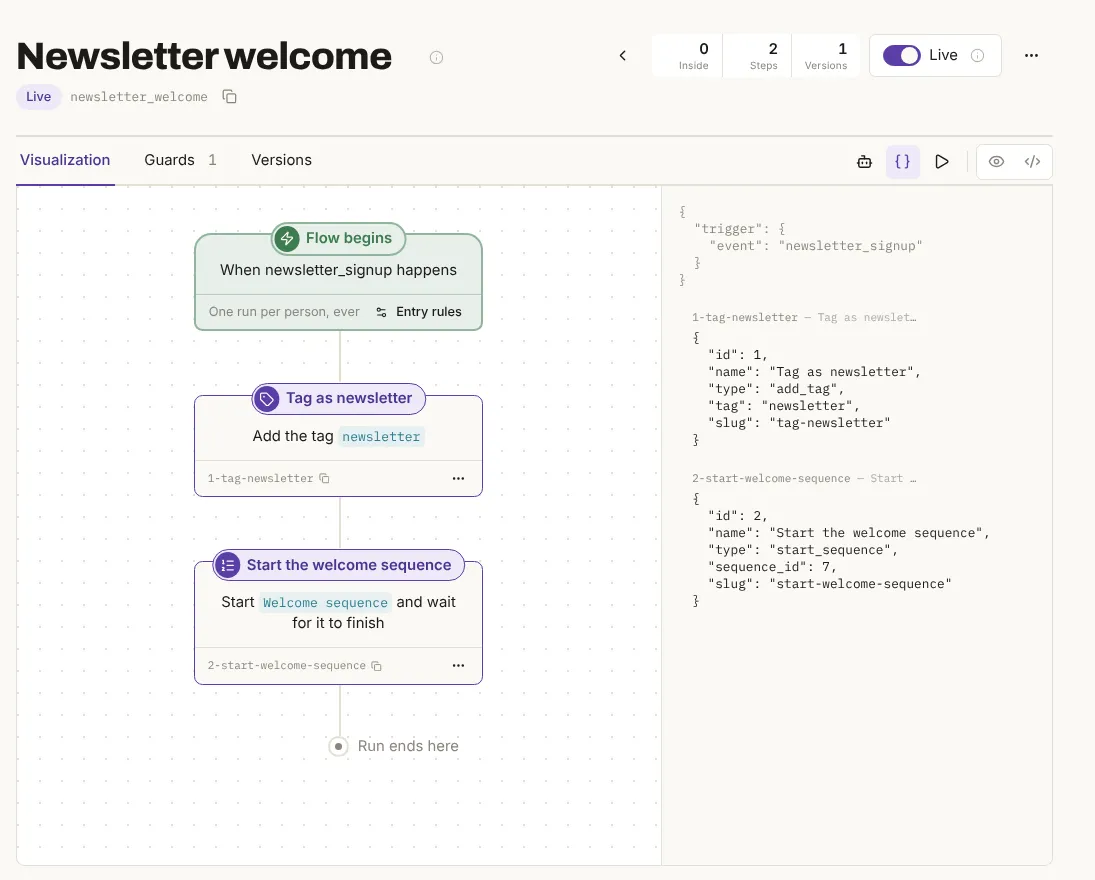
Store events: abandoned checkouts and repeat purchases. Any platform that can send a webhook can start a Mimeo flow, sales included. A checkout event your store sends by webhook can start a flow whose gate waits for the purchase and takes its own path when the wait runs out: that's an abandoned checkout flow. A flow set to Repeat runs allowed (runs) starts again on the next purchase, and the sequence it starts can be set to repeat runs too. Broadcast's own Shopify how-to pages, read , say it "does not receive cart or checkout events", that "a subscriber goes through a given sequence once", so a second order doesn't start the post-purchase sequence again, and that native Shopify events are planned. Need a direct integration with Shopify, Klaviyo or another store? Get in touch.
Your agent or your team, on the same flows. Both run on your server and both have an API, a CLI and an MCP server. In Mimeo, your team works in the dashboard while your agent pulls the same flows as files, edits them and applies the change. Broadcast's MCP has one tool per API operation and flags sends and deletes as destructive, so supporting clients ask first. In both, a fully permitted token can send.
How you stay in control of a change. When your agent pushes a change, Mimeo shows the diff, validates and rehearses it, then applies it, and stops at the first check that fails. Once a flow is live, guards check each email as it sends.
A dry run for a real subscriber, not mock data. Rehearse a flow for a real subscriber (a dry run) and Mimeo shows what would happen to that person, step by step, changing nothing. Broadcast's docs describe a step preview filled "with mock data", where conditions on subscriber data start as false: you see the template, not what a given subscriber will get. From the test:
triggered: true
- Trigger matches — this event would start a run for randa.schamberger.0@example-seed.com
  - Event is newsletter_signup [actual: newsletter_signup]
- **Would add the tag** newsletter
- **Would start** Welcome sequence (3 emails to send) and **wait here** until it finishes
- The rehearsal ends here. They would be standing at this step until Welcome sequence finishes, and a rehearsal can't fast-forward a sequence.
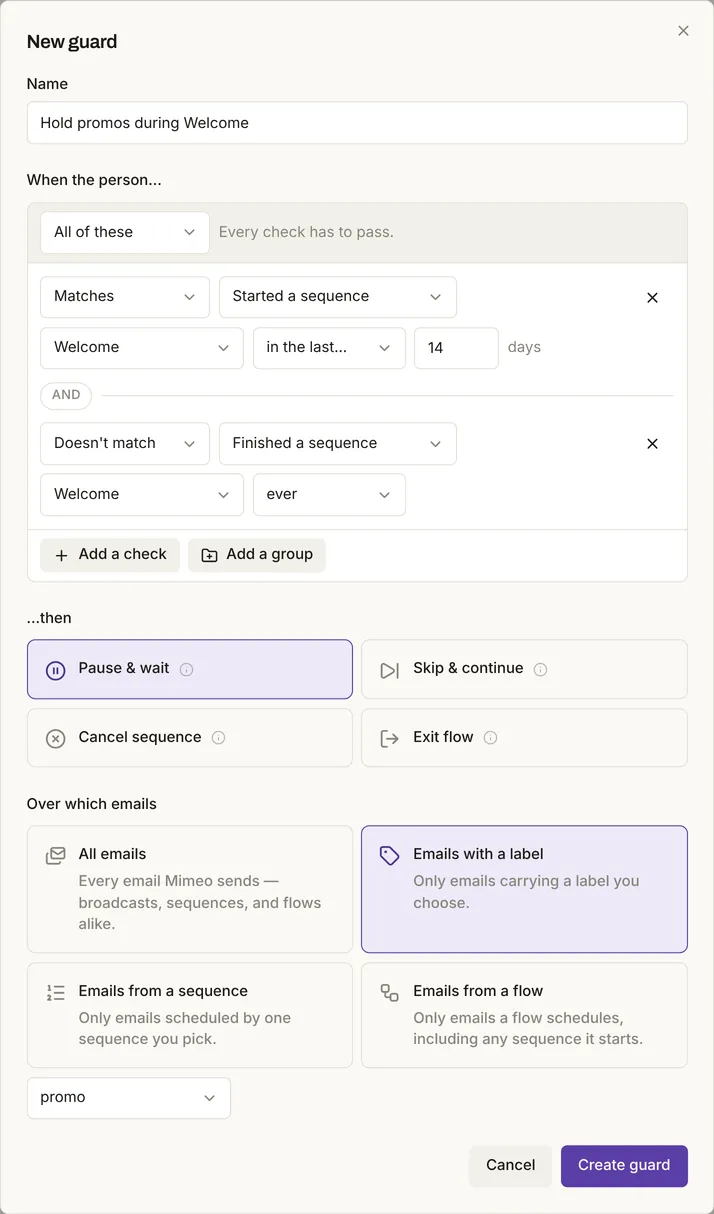
One rule for every email. A Mimeo guard is a standing rule checked as each broadcast, sequence or flow email is about to send. Set it once: one guard holds promotions for anyone still in a welcome sequence, then sends them when they finish. In Broadcast, exclusions are set per broadcast and per sequence, and its segment rules include none for being in a sequence (checked ). Holding a broadcast back from people mid-sequence takes a tag, a segment on it and a tick on every broadcast. Since 3.0 (November 9, 2026), a plugin can add a Before Send hook, but "It works for broadcasts only, not for sequence emails", it doesn't run on test sends, and "If your hook fails or takes more than 5 seconds, the email goes out unchanged."
One welcome sequence, in each
In Mimeo, one signup event started a three-email welcome sequence for the new subscriber only, and each email went out when due; Broadcast's docs describe the same sequence entered by a tag, segment, form or API.
In Mimeo (tested on 0.3.4). Built over the API, as an agent would: three emails, a sequence sending them on day 0, 1 and 4, and a flow starting it on newsletter_signup. Validate checked it before it went live:
{"valid": true, "errors": [], "warnings": []}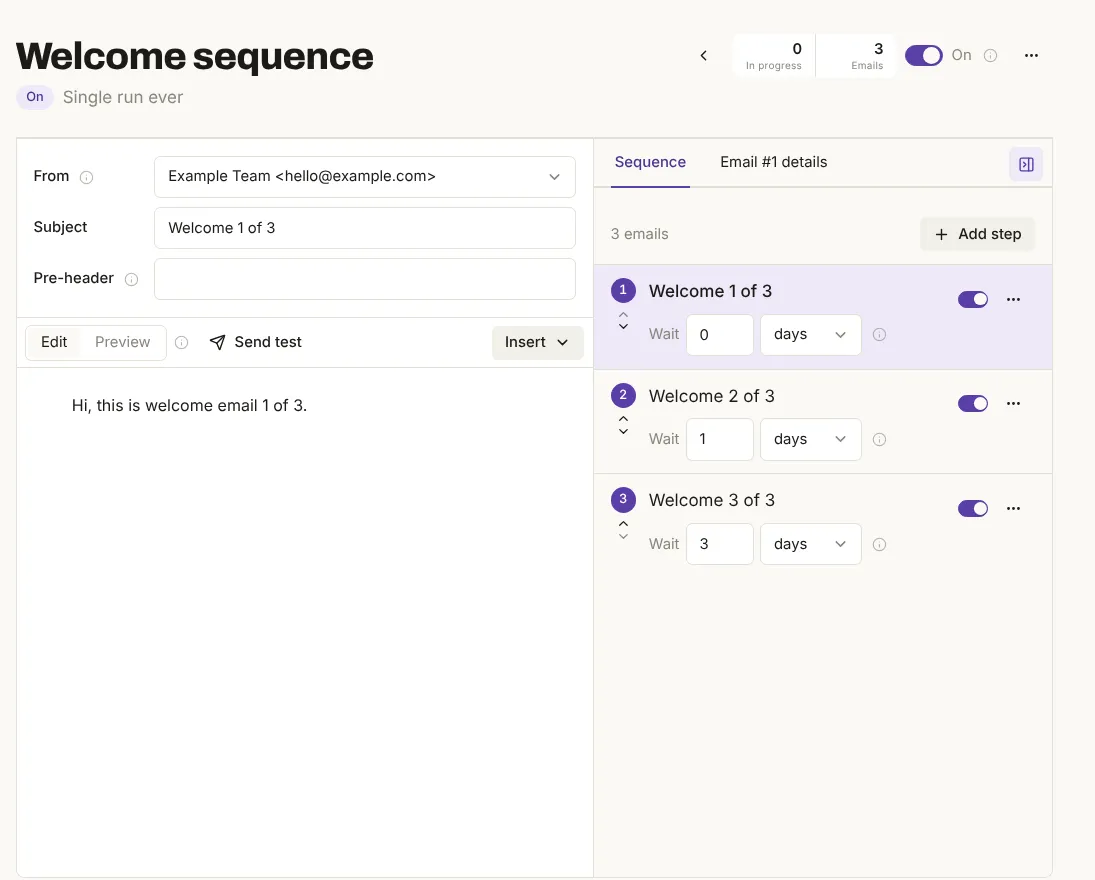
A signup event queued all three sends at once, with their due times:
879 pending  due 2026-11-02 15:50:29Z  Welcome 1 of 3
880 pending  due 2026-11-03 15:50:29Z  Welcome 2 of 3
881 pending  due 2026-11-06 15:50:29Z  Welcome 3 of 3
Postmark accepted each when due (the test moved the day 1 and day 4 due times into the past rather than wait):
Welcome 1 of 3  accepted  postmark  fd8851de-1d4b-4045-9336-772f1f9d2a7c  15:51:00Z
Welcome 2 of 3  accepted  postmark  054996f8-4aa8-4751-9f7b-8c32880ae874  15:52:00Z
Welcome 3 of 3  accepted  postmark  9f3555ed-0a29-4de3-a828-89a46be9c6e9  15:53:00Z
sequence run: completed 15:53:00Z
flow runs for newsletter_welcome: 1 of 201 people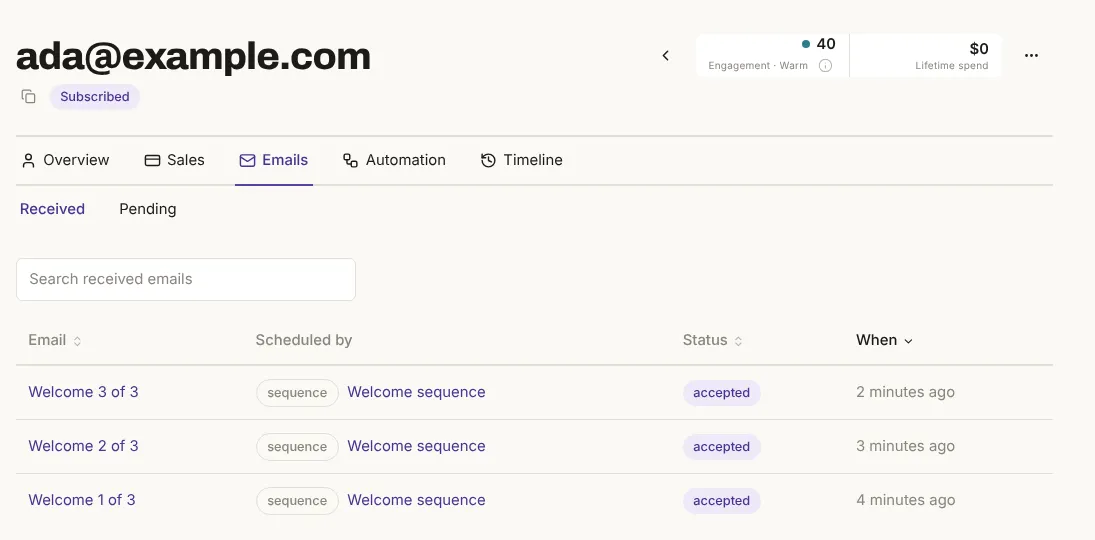
In Broadcast (as documented). Create a sequence, pick its entry point, then add Send Email and Add Delay steps. A tag skips people who "already have the tag"; with a segment, "Subscribers matching this segment will be automatically enrolled".
Where Broadcast is the better pick
Broadcast is a good pick for newsletters: it costs less, covers more servers per license, works with many sending providers and comes with its own newsletter tools.
A lower price, more servers per license. Broadcast's Regular license is $250 once for one server, with every 2.x update and "No renewal." Agency ($450) covers 5 servers and Extended ($1,000) 25, with client installations. Mimeo is $499 for one installation, with a year of support & updates, then $199 a year if you keep them; that price buys the flows and agent access above.
Many sending providers. Broadcast sends through Postmark, Mailgun, SendGrid, Resend, SMTP.com, Inboxroad or any SMTP server. Mimeo sends through your own Postmark or Resend account.
Built-in newsletter tools. Broadcast has embeddable signup forms with double opt-in, and Autopilot, which drafts newsletters with AI and "never sends anything on its own". Its latest release is v3.1.0 (November 10, 2026). In Mimeo, your site, store or agent sends each signup as an event, and that event can start a flow.
Which one fits you
Pick by what carries your email: flows started by what people do, purchases included, or newsletters.
Choose Mimeo if
- Flows carry your email: welcome, onboarding, purchases, renewals, win-backs.
- Any event should start them: a signup, a checkout, a purchase, something in your app.
- A checkout should start a flow that waits for the purchase and follows up when it doesn't come.
- A repeat purchase should be able to start a flow again.
- Your agent and your team should work on the same flows.
Choose Broadcast if
- You mostly send newsletters.
- You want the lower price and no renewal.
- You want to send through Mailgun, SendGrid or any SMTP server.
- You run email for several sites or clients.
- You want a signup form you can embed.
Stay with Broadcast if it already sends what you need and your sequences are a few short ones that don't depend on store events.
Moving from Broadcast to Mimeo
Moving puts your flows on any event, purchases included, run from your agent or the dashboard. Export a CSV, import it with everyone who left kept unsubscribed, and rebuild your sequences; the import steps were tested on 0.3.4 with a file in Broadcast's documented export format.
1 Export your subscribers
In Broadcast, clear the list's filters, open the dropdown beside Add subscriber and choose Export subscribers (CSV). Over 50,000 people, export in parts by tag.
2 Import inactive people as unsubscribed
Move the rows whose Active column reads "No" into their own file. In Mimeo, import that file first with Import everyone as already unsubscribed on, so people you deactivated in Broadcast get no mail from Mimeo.
3 Import everyone else
Mimeo maps Email, First Name, Last Name, Tags and Unsubscribed At for you. Keep Unsubscribed At on Already unsubscribed: in Broadcast, someone can unsubscribe while still marked active. Map Subscribed At to Subscribed on yourself to keep join dates. Leave Active on Skip: Mimeo reads "Yes" there as unsubscribed. An import never resubscribes anyone and starts no automation by default.
4 Rebuild your sequences
Recreate each as a Mimeo sequence started by a flow, or have your agent write them as files. Open and click conditions become flow conditions. In Mimeo, a post-purchase sequence can be set to repeat runs, so each order can start it again.
5 Connect the same sending account
Connect the Postmark or Resend account Broadcast used.
6 Rehearse and test
Dry-run each flow for a real subscriber, then send yourself a test of each email.
7 Cut over
Point your signup forms at Mimeo's event API, and have your store send its checkout and purchase events there by webhook. Then turn off Broadcast's sequences.
What it costs: the $499 license, then $199 a year for support & updates if you want them. Or we do the move with Setup & Launch: $999, or $1,399 with the license.
The migration guide shows the import screens.
Limits
Broadcast was not installed or used; its side comes from its own published pages, checked . The import steps used a file built from Broadcast's documented columns, not a real export. Delivery and inbox placement were not tested for either.
Questions
Short answers to what buyers ask most.
Can Broadcast send abandoned checkout emails?
Not today, by its own Shopify how-to pages (read November 9, 2026): Broadcast does not receive cart or checkout events, and native Shopify events are planned. In Mimeo, a checkout event can start a flow that waits for the purchase and follows up when it doesn't come.
Can a repeat purchase start a flow again?
In Mimeo, yes: a flow set to Repeat runs allowed starts again on the next purchase, and its sequence can repeat too. Broadcast's own Shopify how-to pages (read November 9, 2026) say a subscriber goes through a given sequence once.
Does Mimeo connect to my store?
Any platform that can send a webhook can start a Mimeo flow, sales included. Need a direct integration with Shopify, Klaviyo or another store? Get in touch through the contact page.
Can an AI agent run each one?
Yes. Both have an API, a CLI and an MCP server. In Mimeo your agent works on the same flows your team sees in the dashboard, and diffs, validates and dry-runs a change before applying it.
Can I rehearse a Broadcast sequence for a real subscriber?
Not as its docs describe it: the step preview fills each email with mock data. Mimeo's dry run walks a flow for a real subscriber and changes nothing.
Does Broadcast cost less than Mimeo?
Yes, at list prices: $250 once for one server, with no renewal, against Mimeo's $499 once plus an optional $199 a year after the first year.
- Pricing. Checked .
- License. Checked .
- Changelog. Checked .
- System requirements. Checked .
- ESP integrations. Checked .
- Email sequences. Checked .
- Connecting Shopify to Broadcast. Checked .
- What should a Shopify store email after the order?. Checked .
- Autopilot. Checked .
- Opt-in forms. Checked .
- Broadcast emails. Checked .
- Segments. Checked .
- Before Send hook. Checked .
- Managing subscribers. Checked .
- API authentication. Checked .
- CLI. Checked .
- MCP server. Checked .
- Mimeo 0.3.4. Checked .
- Terms of sale and license. Checked .
- Deploy Mimeo. Checked .
- Sending providers. Checked .
- Flows. Checked .
- Sequences. Checked .
- Guards. Checked .
- Getting started. Checked .
- CSV import. Checked .
- API. Checked .
- CLI. Checked .
- MCP. Checked .
We make Mimeo. We check every claim against the competitor's own pages and update this page when they change.