Stop promotional broadcasts from interrupting a timed sequence
Updated · Tested on Mimeo 0.3.4
To stop promotional broadcasts from interrupting a timed sequence in Mimeo, label your promotional emails and add one guard. For anyone still in the sequence, Pause & wait holds their copy and sends it after they finish, or Skip & continue drops it for them. The guard is checked as each email sends, and the sequence keeps its schedule.
Why one rule beats excluding people on every send
A guard is checked as each email sends, so it covers every promotion without anyone remembering to exclude people.
The usual advice is to tag everyone in a sequence and exclude that tag from each broadcast. It works until someone forgets on one send, and it drops those people from the promotion for good, even if they finish the sequence the next day.
A guard decides person by person, at the moment each email goes out. It can hold the promotion until the person finishes the sequence and then send it, or drop it for them only. Everyone else gets the broadcast at once.
Before you start
You need a sequence that is running and a few minutes in your Mimeo.
- Your Mimeo, with the sequence turned on. The examples use a Welcome sequence.
- How long the sequence lasts, in days, from the first email to the last.
- A sending provider: Postmark or Resend (Amazon SES is coming soon), or the built-in test provider while you explore, which records sends and delivers nothing.
- For the agent tab: Claude Code or Codex, working in your manager repo (Getting yours sets it up).
At the end, promotions reach people outside the sequence at once and people inside it after they finish, or never if you choose, and every hold is visible.
Steps
Both tabs build the same guard, "Hold promos during Welcome", and an optional second one that spaces the sequence after a promotion.
Build it in Mimeo
1 Label your promotional emails
One label lets one guard cover every promotion, now and later.
Open the broadcast, then the Email details tab, and under Labels add promo (or your own word). Labels live on the email, so a guard sees them on every broadcast that uses it. Don't put the label on the sequence's own emails.
2 Create a guard
A guard is a standing rule, so you set it up once.
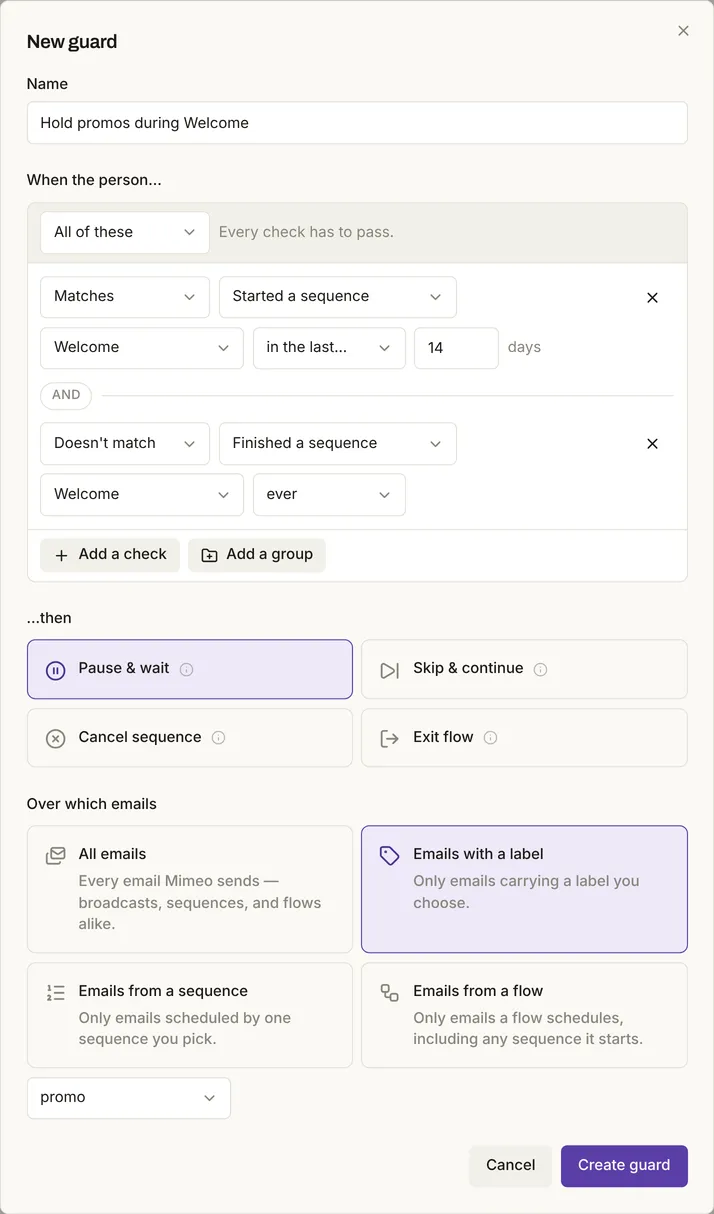
Go to Automation → Guards, click New guard, and give it a Name: "Hold promos during Welcome".
3 Say who is still in the sequence
"Still in the sequence" means the person started it recently and hasn't finished it.
Under When the person…, set the first check to Started a sequence, Welcome, in the last… 14 days. Click Add another check, then set Doesn't match, Finished a sequence, Welcome, ever. The two checks sit under All of these.
Set the days a little longer than the sequence. Someone whose run was canceled never finishes it, so the days are what eventually let their promotions through.
4 Choose hold or skip
The action decides whether people in the sequence get the promotion late or not at all.
Under …then, pick Pause & wait to send it after they finish, for an announcement that stays true. Pick Skip & continue to drop it for them, for a sale that ends before they would get it. Their sequence carries on either way.
5 Point it at the label
The label keeps the guard off everything except promotions.
Under Over which emails, pick Emails with a label, choose promo, and click Create guard. The Welcome emails carry no promo label, so they go out on schedule.
6 Send the broadcast and check who was held
The queue and the guard's activity show exactly who waited and why.
Send the broadcast as usual. In the test, people outside Welcome got it at once and anyone mid-sequence was held. In Automation → Queue, a held email shows held and "Held by Hold promos during Welcome". On the Guards page, the guard's Holding count opens the same list.
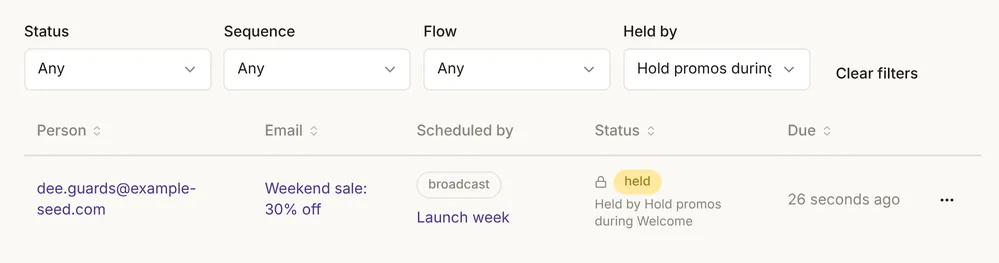
When a held person finished Welcome, the promotion went out on the next check. Recent activity on the Guards page logged both moments: "Held", then "Released" with "condition cleared after 2 days and 2 hours".

With Pause & wait, the broadcast shows as sending until the last held person gets it.
7 Space the sequence after a promotion (optional)
The other direction: when someone just got a promotion, their next sequence email can wait a day.
Create a second guard: Received an email, your promotion, in the last… 1 days; Pause & wait; over Emails from a sequence, Welcome. In the test, the next Welcome email waited a day after the promotion and every later email moved by the same amount, so the sequence kept its spacing.
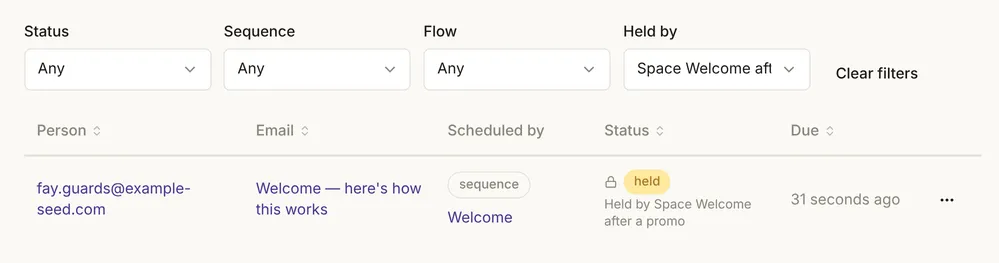
Switching a guard off releases whatever it holds at once; those emails go out on the next check.
Build it with your agent
1 Label your promotional emails
Find every promotional email in my Mimeo and label it promo. Show me which emails and broadcasts that covers, and leave the Welcome sequence's emails unlabeled.
What to look for: a list of emails with the promo label and the broadcasts that use them, and no Welcome emails in it.
2 Ask for the guard
Add a guard called "Hold promos during Welcome": when someone started the Welcome sequence in the last 14 days and hasn't finished it, Pause & wait, over emails labeled promo. Show me the guard before you push it.
What to look for: the guard with both checks, Pause & wait and the promo label, waiting for your yes. A guard goes live as soon as it is pushed; the push checks it but doesn't rehearse it.
3 Choose hold or skip
For the Black Friday sale, change the guard to Skip & continue, since the sale ends before Welcome does. Show me the change first.
What to look for: only the action changing, from Pause & wait to Skip & continue.
4 Check who was held after a send
After the Weekend sale broadcast goes out, tell me who the Hold promos during Welcome guard held, and why.
What to look for: each held person with the guard's reason. In the test, the queue showed "Held by Hold promos during Welcome", and the activity later read "condition cleared after 2 days and 2 hours".
5 Space the sequence after a promotion (optional)
Add a guard that holds the next Welcome email for a day when the person got a promo email in the last day. Pause & wait, over the Welcome sequence. Show me before you push.
What to look for: a guard over the Welcome sequence with a "Received an email … in the last 1 days" check. The Guards API and the MCP server cover guards for your agent.
Limits
A guard acts only when an email sends, and only on the person it is checking.
- Rehearsals don't apply guards. Guards act at send time, so rehearsing a flow won't show them.
- A canceled run counts as still in the sequence until the days in step 3 run out, because it never finishes.
- Pause & wait delivers late. A promotion with a date in it can arrive after the date; use Skip & continue for those. The broadcast stays "sending" until the last hold clears.
- A guard is a check, not a lock. It doesn't stop someone with an operator token from sending.
- The broadcast's own page doesn't list label guards. Its "Guards that apply" showed only guards over all emails or all broadcasts, even while the label guard held someone. Check Automation → Guards instead.
- Tested on demo data with the test provider, not a real list or real delivery.
When not to use this
Three cases have a better tool than a standing guard.
Facts, checked
Every changeable fact on this page, with its source and the date it was last checked.
| Fact | Value | Source | Checked |
|---|---|---|---|
| Release tested | Mimeo 0.3.4 | Release notes | |
| When guards are checked | Tested: as each email is about to send, never on a schedule | Guards | |
| Pause & wait | Tested: held a labeled promotion for a person mid-sequence and sent it when she finished; others got it at once; her sequence kept its schedule | Guards | |
| Skip & continue | Tested: dropped the promotion for that person only; her sequence carried on | Guards | |
| Pausing a sequence email | Tested: the rest of the run moved by the time it waited | Guards | |
| Switching a guard off | Tested: what it held went out on the next check. Deleting it does the same (documented) | Guards | |
| Scopes | The Guards page offers all emails, a label, a sequence or a flow; a label covers every broadcast whose email carries it (tested). The API and MCP also scope to broadcasts (documented) | Guards API | |
| Several guards on one email | Documented: the most severe wins: Exit flow, then Cancel sequence, then Skip & continue, then Pause & wait | Guards | |
| Started and finished a sequence | "Ever" or "in the last N days"; a canceled run counts as started, never finished; 0 days is refused when you save (tested) | Flow schema | |
| Pushing a guard from the manager repo | Documented: it is live once pushed; the push checks it but doesn't rehearse it | CLI | |
| Unsubscribed people | Never emailed; checked before any guard | Guards | |
| Sending providers | Postmark, Resend; Amazon SES coming soon; a test provider that delivers nothing | Set up sending |
How this was tested
Runs on one local install on November 2, 2026, with no real email sent.
- Mimeo 0.3.4 in development, with the app's demo data: 200 people on example-seed.com, plus six test people. No customer data.
- Four send-time tests through the app's own sending code: Pause & wait, Skip & continue, switching the guard off, and a guard over the sequence. Later moments were reached by moving the clock forward.
- The screens were captured the same day after creating the guard in the New guard dialog. Fig. 3's two days were played out with the clock moved back, not waited for.
- The test provider: 0 real sends. The agent prompts were not run with a coding agent.
Next
The docs cover guards, the queue and sequences in full.
- Pricing: cost, license and requirements.
- Guards: the four actions, scopes and recent activity.
- Queue: why an email is held.
- Broadcasts and Sequences.
- Let an AI agent run your email without accidental sends: guards alongside rehearsals and test sends.